As mentioned in this post one of my PSUs is making very quiet 'tsk-tsk-tsk-tsk' sound. I thought recapping would do some good and oh boy, I was definitely right about this one:
However, even after recapping with the kit from Chris I can still hear the sound (maybe a bit quieter, not 100% sure). This has been tested without load, I must purchase the resistors on Monday (afraid to put it in Falcon but I assume the same behaviour - power LED blinking like crazy - would be observed) but still - I don't think any sound like this should be there.
Any idea what could be the cause? It nearly sounds like some mechanical component. I also plan to resolder all the solder joints as recommended by Chris but after that I will be out of ideas (and with an upgrade kit in dead PSU).
You will not be able to post if you are still using Microsoft email addresses such as Hotmail etc
See here for more information viewtopic.php?f=20&t=7296
BOOKMARK THIS PAGE !
https://www.exxosforum.co.uk:8085/IP_CHECK/
You can unban yourself if needed. It also sends me reports to investigate the ban.
https://www.exxosforum.co.uk:8085/IP_CHECK/
You can unban yourself if needed. It also sends me reports to investigate the ban.
DO NOT USE MOBILE / CGNAT DEVICES WHERE THE IP CHANGES CONSTANTLY!
At this time, it is unfortunately not possible to whitelist users when your IP changes constantly.
You may inadvertently get banned because a previous attack may have used the IP you are now on.
So I suggest people only use fixed IP address devices until I can think of a solution for this problem!
At this time, it is unfortunately not possible to whitelist users when your IP changes constantly.
You may inadvertently get banned because a previous attack may have used the IP you are now on.
So I suggest people only use fixed IP address devices until I can think of a solution for this problem!
Falcon PSU making 'tsk-tsk-tsk' sound
-
mikro
- Posts: 810
- Joined: 28 Aug 2017 23:22
- Location: Kosice, Slovakia
Falcon PSU making 'tsk-tsk-tsk' sound
You do not have the required permissions to view the files attached to this post.
-
Neffers
- Posts: 86
- Joined: 25 Jan 2018 00:25
- Location: West Yorks.
Re: Falcon PSU making 'tsk-tsk-tsk' sound
Sounds like the over current protection is kicking in (by design, or fault), or the power to the underlying control circuitry is compromised, if it chirps like a bird. Not great. Don't run it again without load. Deffo don't try it in your precious device! I am no expert.
Resident idiot. (Qualified, got a Diploma and everything)
-
Atarian Computing
- Posts: 579
- Joined: 22 Aug 2017 04:27
Re: Falcon PSU making 'tsk-tsk-tsk' sound
I think you're going at it the wrong way. Clearly you have done something stupid for the PSU to go tsk-tsk-tsk at you. Try apologizing. :lol:
-
gazak28
- Posts: 13
- Joined: 04 Sep 2017 22:26
Re: Falcon PSU making 'tsk-tsk-tsk' sound
Hi Miro,
When I did my Falcon PSU's I got a ticking sound, Rob who had already done his said put it back into the Falcon. Put back into the Falcon turned it on it was ok.
So it could be that it is not under load when testing.
When I did my Falcon PSU's I got a ticking sound, Rob who had already done his said put it back into the Falcon. Put back into the Falcon turned it on it was ok.
So it could be that it is not under load when testing.
-
mikro
- Posts: 810
- Joined: 28 Aug 2017 23:22
- Location: Kosice, Slovakia
Re: Falcon PSU making 'tsk-tsk-tsk' sound
Hey guys,
all right, I'll try it under a load and see what happens.
Rob has one hell of courage to just put it back into the Falcon! ;-)
all right, I'll try it under a load and see what happens.
Rob has one hell of courage to just put it back into the Falcon! ;-)
-
gazak28
- Posts: 13
- Joined: 04 Sep 2017 22:26
Re: Falcon PSU making 'tsk-tsk-tsk' sound
Hi
Forgot to mention that it was all tested with the multi meter first to make sure it was the correct voltage first. Sorry
-
troed
- Posts: 936
- Joined: 21 Aug 2017 22:27
Re: Falcon PSU making 'tsk-tsk-tsk' sound
You cannot test if it's the correct voltage without load though.gazak28 wrote: 01 Jul 2018 08:10 Hi
Forgot to mention that it was all tested with the multi meter first to make sure it was the correct voltage first. Sorry
There are ways to build your own loads using lightbulbs - see Youtube. The other option is of course to buy the resistors exxos carry :) I use them all the time when renovating PSUs or wiring up picoPSUs etc ...
-
kodak80
- Posts: 519
- Joined: 21 Oct 2017 01:14
- Location: Brisbane, QLD, Australia
Re: Falcon PSU making 'tsk-tsk-tsk' sound
Mine was ticking when not under load both before and after re-capping the PSU. Ticking stops as soon as it has a load connected. PSU tested fine on a scope with a dummy load.mikro wrote: 01 Jul 2018 07:24 Hey guys,
all right, I'll try it under a load and see what happens.
Rob has one hell of courage to just put it back into the Falcon! ;-)
Edit: Paul tested his, mine and Gary's Falcon PSUs and both Gary's and mine were fine with Paul's scope when connected to a dummy load. Paul's needed some attention before he can plug it into a motherboard.
I have now seen this noise on at least 3 Falcon PSUs when not connected to a load. They all worked fine when connected to the motherboard. We can get Paul to provide some technical feedback on why the noise occurs when he is next back in Oz in a couple of weeks time.
With regards to testing not under load, I have an analogue multi-meter which shows 5v (on 5v rail) and 7v (on 12v rail) when the Falcon PSU is not connected to a load. Whilst this is not an accurate test, the PSUs show normal voltages under load. Paul created a dummy load rig so that we could test all of our PSUs properly. Paul collected the readings from our 3 PSUs but I did not note these.
Digital multi-meters would not show a reading with the Falcon PSU unless they were connected to a load.
I should add that I currently have an Exxos PSU running my Falcon and the original PSUs are backups. We had to modify my Falcon to get the system to boot with the Exxos PSU but it now works fine with both the new and original PSUs.
Raven060 | Atari Falcon 030 | Atari 1040 STE | Atari 1040 STFM | Atari 1040 STF | Kryoflux & Supercard Pro Flux boards
Creator of the Atari ST Review magazine archive: https://www.chillichai.com/atari-st-review
-
mikro
- Posts: 810
- Joined: 28 Aug 2017 23:22
- Location: Kosice, Slovakia
Re: Falcon PSU making 'tsk-tsk-tsk' sound
That sounds exactly like what I'm experiencing, Rob. For me the confusing part was the fact that the PSU stopped working so I have attributed it to the ticking. Just to be sure I'll purchase the testing resistors to test a load.kodak80 wrote: 01 Jul 2018 12:24Mine was ticking when not under load both before and after re-capping the PSU. Ticking stops as soon as it has a load connected.
-
mikro
- Posts: 810
- Joined: 28 Aug 2017 23:22
- Location: Kosice, Slovakia
Re: Falcon PSU making 'tsk-tsk-tsk' sound
Well, this whole story has an interesting resolution.
First I resoldered the whole PSU PCB, just to be totally sure. Then I bought the resistors for dummy load testing. I could see 5V/10.84V straight away (to my huge surprise - the PSU has been [still] working!) however when moving the PCB wires I could again hear my favourite 'tsk-tsk-tsk'.
So I was like "Sure! This must be it, loose contacts on the wires!"... resoldered the wires, checked and cleaned everything... and nope, nothing!
Then I started to be really pissed off. Took a PSU from another Falcon, put it into my testing Falcon, switched on... and you've guessed it, nope, nothing! In that moment I realised two things: a) I should have tested it with another PSU as the first thing b) I might have killed my Falcon somewhere along the road.
Took the previously working PSU, put it into its original Falcon, switched on... working. Took the PSU out, put the repaired/recapped one... working.
Oh sh*t, I've really killed the other Falcon! OK, OK, let's calm down. Took everything out (ScreenEye, HDD, keyboard, ...), put the PSU from another Falcon into this one... working! Huh? Took this PSU out, put the recapped one, switched on... working again, huh?!
So no, fortunately I haven't killed my Falcon. But only by pure luck. Closer investigation has revealed that the culprit was... the keyboard, or better said naked keyboard (no protection foil on its PCB...) plus this addon: As you might have guessed, the RTC's pins were touching the keyboard's PCB leading to a pretty hard deadlock -- Falcon not powering up at all and therefore not putting any load on the PSU and therefore PSU making the infamous sounds.
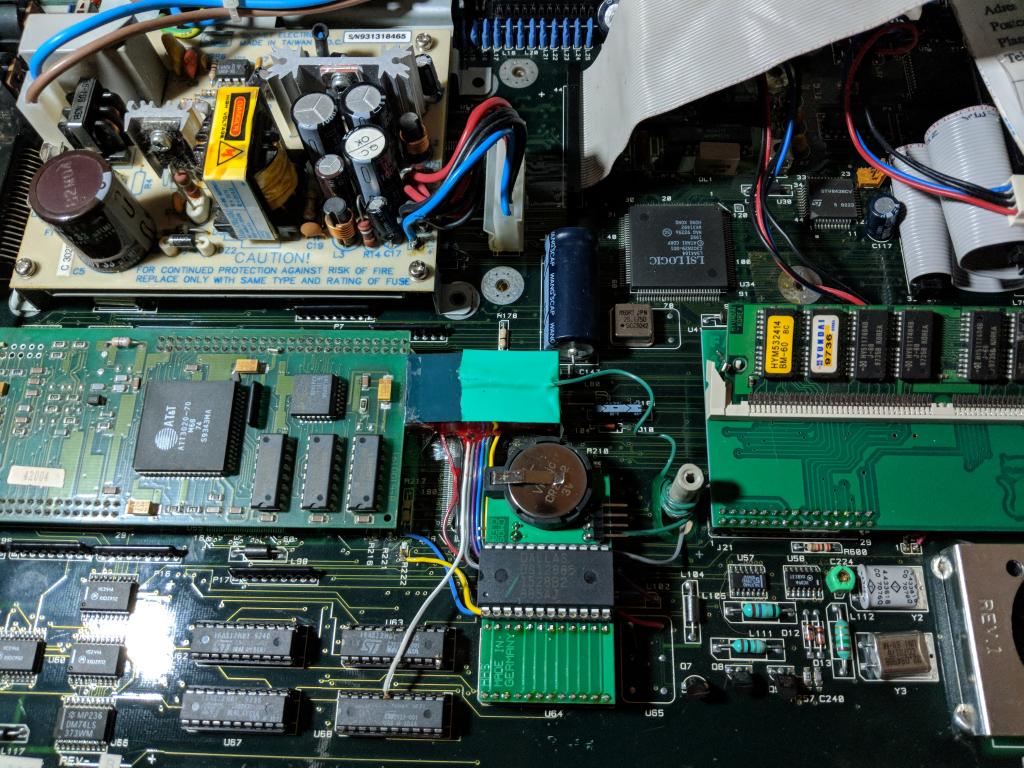
So all in all:
First I resoldered the whole PSU PCB, just to be totally sure. Then I bought the resistors for dummy load testing. I could see 5V/10.84V straight away (to my huge surprise - the PSU has been [still] working!) however when moving the PCB wires I could again hear my favourite 'tsk-tsk-tsk'.
So I was like "Sure! This must be it, loose contacts on the wires!"... resoldered the wires, checked and cleaned everything... and nope, nothing!
Then I started to be really pissed off. Took a PSU from another Falcon, put it into my testing Falcon, switched on... and you've guessed it, nope, nothing! In that moment I realised two things: a) I should have tested it with another PSU as the first thing b) I might have killed my Falcon somewhere along the road.
Took the previously working PSU, put it into its original Falcon, switched on... working. Took the PSU out, put the repaired/recapped one... working.
Oh sh*t, I've really killed the other Falcon! OK, OK, let's calm down. Took everything out (ScreenEye, HDD, keyboard, ...), put the PSU from another Falcon into this one... working! Huh? Took this PSU out, put the recapped one, switched on... working again, huh?!
So no, fortunately I haven't killed my Falcon. But only by pure luck. Closer investigation has revealed that the culprit was... the keyboard, or better said naked keyboard (no protection foil on its PCB...) plus this addon: As you might have guessed, the RTC's pins were touching the keyboard's PCB leading to a pretty hard deadlock -- Falcon not powering up at all and therefore not putting any load on the PSU and therefore PSU making the infamous sounds.
So all in all:
- I have one hell of a PSU ready to roll (resoldered, recapped, cleaned up...)
- nobody got hurt ;)
- learned that the Falcon PSU is making a specific sound when not under load (thanks Rob for this hint, it made testing much easier!)
- learned to measure PSU load and something about power, resistance and voltages
- brushed up my de/soldering skills (and equipment)
You do not have the required permissions to view the files attached to this post.
Who is online
Users browsing this forum: CCBot and 8 guests