Falcon maintenance: Phantom&CT60e

Problems with your machine in general.
qq1975b
Posts: 61
Joined: 18 Sep 2017 22:16

Falcon maintenance: Phantom&CT60e

Post by qq1975b »

Hi,

I have a Falcon that has a Phantom+CT60e. I have had some issues with it: It takes several reset to finally boot OK in 060 mode. In 030 it seems to work OK.
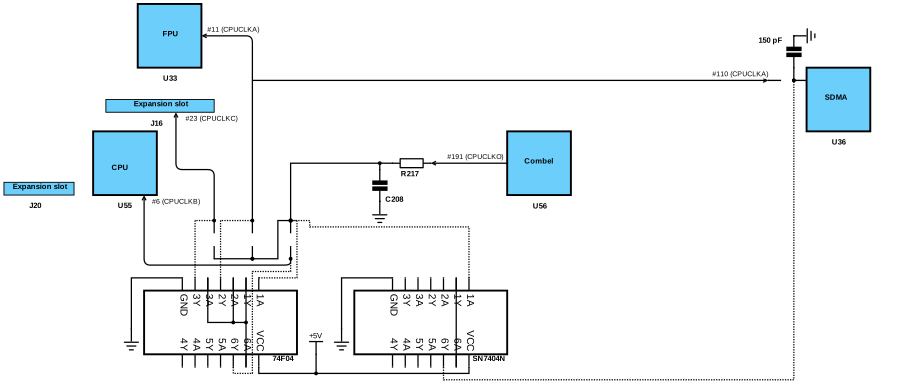
I have also noticed that the main capacitor has been dried a bit so I decided to replace all caps. Done that I thought I could review the Phantom installation. After some questions answered by Ctirad I think it is time to replace the old clock patch for a new one. Ctirad recommended me to install the two chip versions (LS7404NS and a 74F04) following this diagram: https://mikrosk.github.io/clockpatch/Clockpatch-2.2.svg
I don't think I can do that because I am not used to read them, so, reading Steve's thread about using Exxos's clock patch with a Phantom Falcon, I think I could do that instead. Exxos's clock patch installation is very well documented with videos and pictures but my question is...how to disassemble the actual one? I have to desolder the cables in yellow circle and install the new one? or do I have to do something else (there is a red cable that goes from R221 to the Phantom module)?

Thank you.

20220213_201502B.jpg
20220213_201605b.jpg
20220213_201530b.jpg
You do not have the required permissions to view the files attached to this post.
User avatar
exxos
Site Admin
Site Admin
Posts: 28344
Joined: 16 Aug 2017 23:19
Location: UK

Re: Falcon maintenance: Phantom&CT60e

Post by exxos »

Holy crap thats a mess to undo. I fear only Ctirad may be able to make sense of that lot.
mikro
Posts: 820
Joined: 28 Aug 2017 23:22
Location: Kosice, Slovakia

Re: Falcon maintenance: Phantom&CT60e

Post by mikro »

What a mess indeed. But you reminded me that I promised you to send you my Phantom installation so here you go. This should make it much clearer what to replace:

PXL_20220213_213821366.jpg
You do not have the required permissions to view the files attached to this post.
User avatar
exxos
Site Admin
Site Admin
Posts: 28344
Joined: 16 Aug 2017 23:19
Location: UK

Re: Falcon maintenance: Phantom&CT60e

Post by exxos »

@Steve Fitted Phantom with my clock patch, but not sure if he took images of the install ?
qq1975b
Posts: 61
Joined: 18 Sep 2017 22:16

Re: Falcon maintenance: Phantom&CT60e

Post by qq1975b »

I think that I can desolder all of the actual clock patch and install Exxos's clock patch instead but I don't know what to do about the red wire in orange circle. Should I leave it? Watching Steve's post it seems it is not necessary but I don't have his full motherboard picture (https://www.exxosforum.co.uk/forum/viewt ... it=phantom).

In mine:
On the bottom left: clock patch
Bottom right: Phantom
Above U36: 44100khz sample rate support (Ctirad told me that, I didn't have any idea about it :oops: )

20220214_111800[3080]b.jpg
You do not have the required permissions to view the files attached to this post.
Steve
Posts: 3305
Joined: 15 Sep 2017 11:49

Re: Falcon maintenance: Phantom&CT60e

Post by Steve »

Yeah I've already had a lengthy chat in PM with qq and provided him all the clock patch installation documents so he can reverse it. strange thing going on here is:

* On most phantom installs the clock patch isn't usually connected by a wire to the phantom itself so I'm wondering what signal that is, if it's 5v or GND then there's nothing to worry about, but it needs investigating.

Just my main concern.. but besides that it shouldn't be too difficult. I also recommend shielding the Phantom and using higher quality wires. Like Kynar for signals.
mikro
Posts: 820
Joined: 28 Aug 2017 23:22
Location: Kosice, Slovakia

Re: Falcon maintenance: Phantom&CT60e

Post by mikro »

I don't have it with me at work but I'm pretty sure the RTF document with Phantom installation had the wires described?

EDIT: More I'm looking at the photo... it's worth checking. Both Phantom and clockpatch seem to take +5V from the big capacitor's +5V, so it doesn't make sense why Phantom and clockpatch should have any +5V wire between each other.
qq1975b
Posts: 61
Joined: 18 Sep 2017 22:16

Re: Falcon maintenance: Phantom&CT60e

Post by qq1975b »

There isn't any cable going from the clock patch to the Phantom (I am going to edit the first post). It goes from r221 to the Phantom (orange circles in my last picture). Mikro's installation doesn't have this. Looking out in the manual Steve send me, I have found that it is for overclock the FPU too. If this wire is installed then the FPU runs at 32/50 MHZ depending if the Phantom is off/on.

I can also replace all the cables for a better ones too and isolate all the little boards from the mainboard as Steve suggested.

I will try it and find out how it works.....
Steve
Posts: 3305
Joined: 15 Sep 2017 11:49

Re: Falcon maintenance: Phantom&CT60e

Post by Steve »

qq1975b wrote: 14 Feb 2022 11:17 There isn't any cable going from the clock patch to the Phantom (I am going to edit the first post). It goes from r221 to the Phantom (orange circles in my last picture). Mikro's installation doesn't have this. Looking out in the manual Steve send me, I have found that it is for overclock the FPU too. If this wire is installed then the FPU runs at 32/50 MHZ depending if the Phantom is off/on.

I can also replace all the cables for a better ones too and isolate all the little boards from the mainboard as Steve suggested.

I will try it and find out how it works.....
Don't worry, simply remove the clock patch and all its cables. Since that line isn't going to the Phantom you're all good. Patch your SDMA trace line in the photo of my board you saw & install Exxos clock patch.

Then test it - if it all works, then you can think about tidying up the Phantom and using some better cables.

My tips for patching the SDMA trace - use a single-core strip of wire like I did, scratch off the protective layer on-top off the trace carefully with a knife on both ends so that copper shines through (the trace) then clean it up with alcohol. Then coat with flux. Then TIN the trace, so that it goes silver. Then re-cover with flux. Then TIN your patch wire (single core remember) Place the first end of your wire on the first trace, pin it down with a flat edge like a screw driver - apply flux then just press the soldering iron on top and lift off (one side done) Next bit is easier as one side is pinned down, bend it over the other side, apply flux & press soldering iron. Done. Should be nice and clean - snip off any excess if required, but best to have it cut to length if possible or you can lift the track.

Another tip: You could do it without a single-core small wire, which might be easier actually. Since Exxos recommends the resistor being soldered in place of that ceramic capacitor near the SDMA. You could effectively solder one end of the resistor on the IC chip leg as normal, then since it is rather static and easy to position, you can use other end of the resistor leg to actually patch the trace. If you know what I mean.
qq1975b
Posts: 61
Joined: 18 Sep 2017 22:16

Re: Falcon maintenance: Phantom&CT60e

Post by qq1975b »

Steve wrote: 14 Feb 2022 20:11 My tips for patching the SDMA trace - use a single-core strip of wire like I did, scratch off the protective layer on-top off the trace carefully with a knife on both ends so that copper shines through (the trace) then clean it up with alcohol. Then coat with flux. Then TIN the trace, so that it goes silver. Then re-cover with flux. Then TIN your patch wire (single core remember) Place the first end of your wire on the first trace, pin it down with a flat edge like a screw driver - apply flux then just press the soldering iron on top and lift off (one side done) Next bit is easier as one side is pinned down, bend it over the other side, apply flux & press soldering iron. Done. Should be nice and clean - snip off any excess if required, but best to have it cut to length if possible or you can lift the track.
Thank you for the tips, I patched the SDMA trace the way you suggested.

Done all the recap and the clock patch replacement I have tested the Falcon and I have found the following:

In 030 mode and Phantom mode. It seems it all works OK.
In 060 mode (+SVidel): I cannot make it work. It usually starts and reboots when reading the boot prgs and config. It can restart several times and at the end it stays in a white screen (in HDMI) with the bee. I can move the bee but nothing else happens. Few times it manages to go to the desktop with basic video configuration and no drives. The CT60e is configured to work at 70MHZ. Does the Phantom installation have any effect in the 060 mode?

Return to “HARDWARE ISSUES”

Who is online

Users browsing this forum: ClaudeBot, MasterOfGizmo and 4 guests