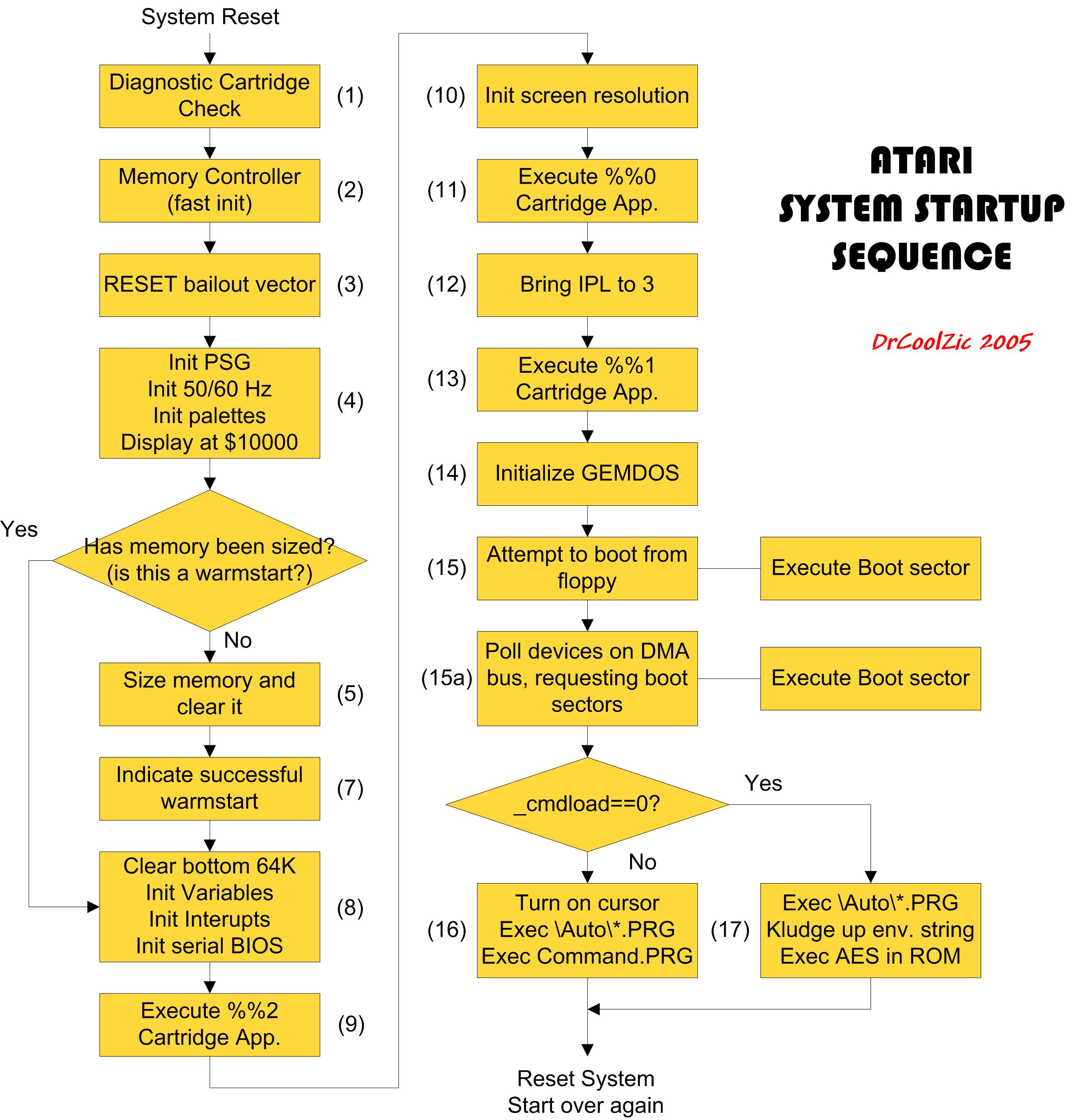
- System_Startup.jpg (462.26 KiB) Viewed 6056 times
https://info-coach.fr/atari/documents/_ ... tartup.jpg
Yeah I had that thought yesterday when looking through it, just need to manually remove all ifdef:ed code only valid for TT/Falcon.exxos wrote: Tue Sep 18, 2018 1:37 pm Can someone post the source file here ? Would be even better if someone could maybe label up exactly what is going on in the startup code step by step.
Code: Select all
_main:
/* disable the interrupts */
/* this is useless on cold boot, */
/* but it matters for software reset */
        move    #$2700,sr

        reset                  /* reset all hardware */

/*
 * Check for diagnostic cartridge
 */
        cmp.l   #$fa52235f,cart_base    /* magic - is cartridge present? */
        bne.s   nodiag                  /* no -> go on */
        lea     nodiag(pc),a6           /* save return address */
        jmp     cart_base+4             /* execute diagnostig cartridge */
nodiag:

        lea       memcret(pc),a6
        bra       memchk
memcret:
        bne.s      noreset
        move.b    (memctrl).w,(memconf).w  /* initialize memory controller */

resetvec:
/*
 * Check, if we should jump to a reset vector after warmboot
 * The high byte of resvector must be zero,
 * it must be even, and cannot be entirely zero.
 */


        cmpi.l   #$31415926,(resvalid).w  /* Jump to resetvector? */
        bne.s    noreset                /* No --> noreset */
        move.l   (resvector).w,d0       /* Yes: old resvec to d0 */
        tst.b    (resvector).w          /* bits 24..31 must be zero */
        bne.s    noreset                /* (they aren't, so punt) */
        btst     #0,d0                  /* Address odd ? */
        bne.s    noreset                /* Yes --> noreset */
        movea.l  d0,a0                  /* resvec */
        lea      resetvec(pc),a6        /* save return address */
/* Note: the return address intentionally points to the resvalid test. */
/* So the reset routine must explicitly clear resvalid before returning */
/* to a6, otherwise there will be an infinite loop. */
        jmp      (a0)                   /* jump to resvec */
noreset:


/*
 * memory configuration
 */

/*
 * do/test memory config and clear it
 *  Initialize PSG output ports.
 *  Make port A and B output-only,
 *  initialize floppy select lines (so
 *  that none are selected)
 */
meminit:

        lea.l     (psgsel).w,a0
        move.b    #$07,(a0)  /* select mixer control */
        move.b    #$C0,2(a0) /* Port A+B = output */
        move.b    #$0E,(a0)  /* select Port A */
        move.b    #$07,2(a0) /* deselect floppy drives */

        btst      #0,_os_conf+1             /* check bit: configured for 50hz? */
        beq.s     notpal                    /* (nope -- we're good ol' NTSC) */
        lea       ret_1b(pc),a6
        bra       waitvbl                   /* a short delay for PAL */
ret_1b: move.b    #2,(v_syncmod).w          /* yes -- twiddle to 50hz */
notpal:

/*
 * next, set up the palette(s)
 */

        lea.l     (palette).w,a1
        move.w    #16-1,d0
        lea.l     dflt_pal(pc),a0
initpal:
        move.w    (a0)+,(a1)+
        dbf       d0,initpal

/* set Video screen memory position to 0x10000 */
        move.b    #$01,(v_bas_h).w
        clr.b     (v_bas_m).w

        move.b    (memctrl).w,d6                /* d6 = memory controller configuration */
        move.b    d6,(memconf).w                /* setup memory controller configuration register */

        move.l    (_phystop).w,d5               /* d5 -> (possible) top of physical mem */
        lea       memcret2(pc),a6               /* load return address */
        bra       memchk                        /* check if the memory configuration is valid */
memcret2:
        beq       nomemchk

/* First we try to configure the memory controller */

            clr.w     d6
            move.b    #$a,(memconf).w			/* default: setup controller for 2Mb/2Mb */

            movea.w   #$8,a0
            lea       $200008,a1				/* + 2Mb */
            clr.w     d0
chkpatloop: move.w    d0,(a0)+					/* fill 512-8 bytes with a test pattern */
            move.w    d0,(a1)+
            add.w     #$fa54,d0
            cmpa.w    #$200,a0
            bne.s     chkpatloop

            move.b    #90,(v_bas_l).w			/* wrote low byte of video address */
            tst.b     (v_bas_m).w				/* touch the middle byte (this should reset the low byte) */
            move.b    (v_bas_l).w,d0
            cmp.b     #90,d0					/* low byte not reset? */
            bne.s     chkmem1
            clr.b     (v_bas_l).w				/* try a different low byte value */
            tst.w     (palette).w				/* touch the color palette */
            tst.b     (v_bas_l).w				/* low byte changed? */
            bne.s     chkmem1
            move.l    #$40000,d7				/* 256Kb offset */
            bra.s     chkmem1b
chkmem1:    move.l    #$200,d7					/* 512 byte offset */
chkmem1b:   move.l    #$200000,d1				/* 2Mb = maximum size per bank */

chkmemloop: lsr.w     #2,d6						/* shift memory configuration down by a bank (bank 1 is in bits 0..1, bank 0 is in bits 2..3) */

            movea.l   d7,a0						/* + 512/256Kb bytes */
            addq.l    #8,a0
            lea       chkmem3(pc),a4
            bra       memchk0
chkmem3:    beq.s     chkmem7					/* bank is not working => */

            movea.l   d7,a0
            adda.l    d7,a0						/* + 1024/512Kb byte */
            addq.l    #8,a0
            lea       chkmem4(pc),a4
            bra       memchk0
chkmem4:    beq.s     chkmem6					/* bank has 512Kb of memory => */

            movea.w   #$8,a0					/* + 0 bytes */
            lea       chkmem5(pc),a4
            bra       memchk0
chkmem5:    bne.s     chkmem7					/* bank is empty => */

            addq.w    #4,d6						/* 4+4 = 1000 2Mb bank size */
chkmem6:    addq.w    #4,d6						/* 4   = 0100 512Kb bank size */
chkmem7:    sub.l     #$200000,d1				/* - 2Mb */
            beq.s     chkmemloop
            move.b    d6,(memconf).w			/* set memory configuration */

/* =========================================================================== */
/* ==== This part is executed only on first boot ============================= */
/* =========================================================================== */

        /* Clear the memory */
        movea.w   #sysvars_start,a0
        move.l    d5,d4
        moveq.l   #0,d0
clrmem:
        move.l    d0,(a0)+
        move.l    d0,(a0)+
        move.l    d0,(a0)+
        move.l    d0,(a0)+
        cmpa.l    d4,a0
        bne.s     clrmem

        /* Store the ST-RAM parameters in the ST-RAM itself */
        move.b  d6,(memctrl).w             /* set copy of hw memory config */

        move.l  d5,(_phystop).w            /* highest address as phystop */

        move.l    #$752019F3,(_memvalid).w /* set memvalid to ok */
        move.l    #$237698AA,(_memval2).w  /* set memval2 to ok */
        move.l    #$5555AAAA,(_memval3).w  /* set memval3 to ok */
Actually a white border and black screen would indicate all 1s being read from RAM, I think.exxos wrote: Mon Sep 17, 2018 11:05 pm It sparked my interest as if 50Hz is being set, but not the palette data (still black screen) what actually goes on in the code between those 2 things ?
Would be all zeros for black though wouldn't it ?troed wrote: Tue Sep 18, 2018 7:16 pm Actually a white border and black screen would indicate all 1s being read from RAM, I think.
No, think palette. Color 0 is white (border color) and color 15 (low res) is black. So, if all bitplanes are 1s the "graphics" is an image of all palette color 15 = black.