
Hello I'm hoping someone can guide me, I have just opened the Atari TT and noticed the rear fan behind the hard drive is not connected, this is probably best its wiring looks a bit dodgy and there are no markings to indicate voltage. I would like to replace this fan, the nearest connection is a 3 pin J102, but without knowing I don't want to risk it.
Thanks
Can all registered uses please login, even just for a few minutes..
It helps build a picture where our "good traffic" is coming from..
Thanks :)
It helps build a picture where our "good traffic" is coming from..
Thanks :)
TT030 replacement case fan and where to connect
TT030 replacement case fan and where to connect
XEGS, STF/FM/E CBM 64 VC20 PET , ZX81, ZX +3 Harlequin ZXuno


Re: TT030 replacement case fan and where to connect
Hi zack4mac - I have replaced my fans in TT with these https://noctua.at/en/nf-a6x25-flxzack4mac wrote: Sat Apr 06, 2019 9:56 am Hello I'm hoping someone can guide me, I have just opened the Atari TT and noticed the rear fan behind the hard drive is not connected, this is probably best its wiring looks a bit dodgy and there are no markings to indicate voltage. I would like to replace this fan, the nearest connection is a 3 pin J102, but without knowing I don't want to risk it.
Thanks
They are very quiet. Also you could use a fan break out board like this to power the fans
https://www.exxosforum.co.uk/forum/view ... =796#p5649

Re: TT030 replacement case fan and where to connect
Later revisions of TT didn't even have that fan installed. For reference:
J102 as you said. Pin 1 is +12V. Pin 2 & 3 are ground.
J102 as you said. Pin 1 is +12V. Pin 2 & 3 are ground.
- Atari_TT_auxfan_J102_1.gif (4.24 KiB) Viewed 4290 times
- Atari_TT_auxfan_J102_2.gif (82.92 KiB) Viewed 4290 times
Re: TT030 replacement case fan and where to connect
As DoG mentions pin 2 & 3 are ground so if you get the Noctua its a 3 pin connector.
DONT just plug it straight in. You will be able to plug just the (EDIT: +12V) and GND pins of the socket into the connector to power the fan.
Here is a picture of the pinout of the Noctua 3 pin so you only plug the red and black part of the socket in and not the yellow.
https://noctua.at/media/wysiwyg/faqs/no ... v_fans.png
DONT just plug it straight in. You will be able to plug just the (EDIT: +12V) and GND pins of the socket into the connector to power the fan.
Here is a picture of the pinout of the Noctua 3 pin so you only plug the red and black part of the socket in and not the yellow.
https://noctua.at/media/wysiwyg/faqs/no ... v_fans.png
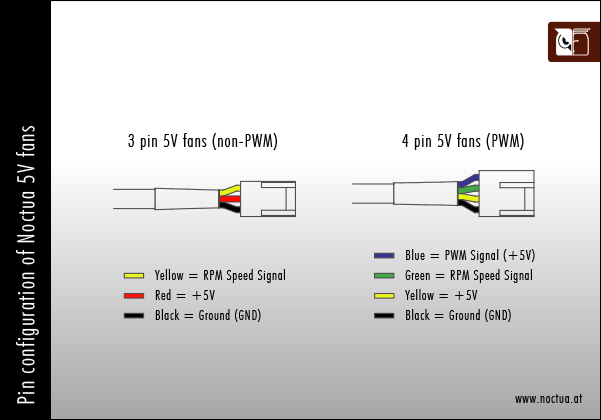
Re: TT030 replacement case fan and where to connect
Why 5V? Isn't the fan linked in the previous post a 12V one?Icky wrote: Sat Apr 06, 2019 11:01 pmDONT just plug it straight in. You will be able to plug just the +5V and GND pins of the socket into the connector to power the fan.
Here is a picture of the pinout of the Noctua 3 pin so you only plug the red and black part of the socket in and not the yellow.
Re: TT030 replacement case fan and where to connect
Good spot mikro - was on auto pilot typing in the answer. Will correct.mikro wrote: Sun Apr 07, 2019 10:42 amWhy 5V? Isn't the fan linked in the previous post a 12V one?Icky wrote: Sat Apr 06, 2019 11:01 pmDONT just plug it straight in. You will be able to plug just the +5V and GND pins of the socket into the connector to power the fan.
Here is a picture of the pinout of the Noctua 3 pin so you only plug the red and black part of the socket in and not the yellow.
EDIT: Corrected. Thanks.
Re: TT030 replacement case fan and where to connect
I took the advice of Icky and ordered two nf-a6x25-flx from Amazon at £25.60 arrived a few minutes ago and will be connected without the speed control.
Quite excited, cant wait to start using it!
Cheers everyone
Quite excited, cant wait to start using it!
Cheers everyone
XEGS, STF/FM/E CBM 64 VC20 PET , ZX81, ZX +3 Harlequin ZXuno