Can all registered uses please login, even just for a few minutes..
It helps build a picture where our "good traffic" is coming from..
Thanks :)

Installing a CPU upgrade for my STE

Help & information about the STE V1 series boosters.
VMSZealot
Posts: 14
Joined: Mon Aug 04, 2025 11:02 am

Installing a CPU upgrade for my STE

Post by VMSZealot »

I got lucky this Christmas and I was given some bits and bobs for my (new to me) Atari STE. The ROM upgrade went well - I discovered that it bombs in TOS 2.06 mode if the floppy (or Gotek) drive isn't connected, and that it seems somewhat slow compared with TOS 1.62, but other than that all works well. My SIMMs even passed RAM check with the ST - so all seems well. Alas, the CPU upgrade doesn't seem to be quite so simple. My ROM board is different to the ROM board in the instructions. I think I can work it out, but I'm not so confident that I want to risk the safety of the new parts or, worse, my STE.

I'm a noob with STs, so it would be wonderful if I could be given definitive advice on where to stick my patch wires (no, not there!)
Image

As you can see, my dual ROM board is a little newer - where should the patch wires be soldered on it? (clearly, stuffing them down the disk drive mounting post is not the correct solution!) Does anyone have a link to helpful instructions, or a photo of the correct installation?

To my old eyes, the accelerator board looks a little wonky, but I inserted it carefully, checking the pin alignment as I went with a bright torch, and it seems to be correct, with nothing bent or out of place. I really hope that it is correct!

For the cherry on the cake, if I wanted to have a one switch solution so that I can enable 32MHz and the 2.06 ROM at the same time, and fall back to 8MHz with 1.62 solution, is this possible? Other than a switch (which I have) how would I wire this up?

All advice gratefully received. My STe is currently in pieces and I'm looking forward to playing Doom on it (okay, tongue in cheek there - I'm not expecting the 32MHz upgrade to be that miraculous! - but Wolfenstein, at least!)
User avatar
exxos
Site Admin
Site Admin
Posts: 28729
Joined: Wed Aug 16, 2017 11:19 pm
Location: UK
Contact:

Re: Installing a CPU upgrade for my STE

Post by exxos »

Pink = 32mhz
Blue = 8mhz switch to gnd
Green = TOS CE
Brown = ROM BANK SEL to 8mhz SEL.. but this may work backwards to what you spect, depends on which order the TOS is flashed into the ROM.

STMobo.jpg
STMobo.jpg (585.56 KiB) Viewed 1503 times
VMSZealot
Posts: 14
Joined: Mon Aug 04, 2025 11:02 am

Re: Installing a CPU upgrade for my STE

Post by VMSZealot »

I’m very glad I asked now! I’d have gotten it entirely wrong - I was guessing that it went to ce on the TOS Switcher. Looks like I’ll need to remove the accelerator from its socket. Let’s hope I can remove it and reinsert it without damaging anything!

You say that the grade of patch wire is important and to be careful to use the patch wire provided. For the additional wires, does the same hold true - or can i use the patch wires that I have already? And if I wire it up as shown, will the accelerator be enabled/disabled through the use of the jumper on the ROM board (jumper on is ROM 2.06, jumper off is 1.62) so that 32MHz is 2.06 and 8Mhz is 1.62?

Thank you so much for your help.
User avatar
exxos
Site Admin
Site Admin
Posts: 28729
Joined: Wed Aug 16, 2017 11:19 pm
Location: UK
Contact:

Re: Installing a CPU upgrade for my STE

Post by exxos »

VMSZealot wrote: Sun Dec 28, 2025 8:57 pm You say that the grade of patch wire is important and to be careful to use the patch wire provided. For the additional wires, does the same hold true - or can i use the patch wires that I have already?
The 32mhz wire is important to use the "thin" wire provided. The CE wire should also be the thin wire, but maybe not so important. other wires are not important what they are.
if I wire it up as shown, will the accelerator be enabled/disabled through the use of the jumper on the ROM board (jumper on is ROM 2.06, jumper off is 1.62) so that 32MHz is 2.06 and 8Mhz is 1.62?
it suggest so yes.. but trying it be better for confirmation.
User avatar
Darklord
Site sponsor
Site sponsor
Posts: 1626
Joined: Wed Sep 20, 2017 1:41 pm
Location: Prestonsburg
Contact:

Re: Installing a CPU upgrade for my STE

Post by Darklord »

VMSZealot wrote: Sun Dec 28, 2025 4:51 pm All advice gratefully received. My STe is currently in pieces and I'm looking forward to playing Doom on it (okay, tongue in cheek there - I'm not expecting the 32MHz upgrade to be that miraculous! - but Wolfenstein, at least!)
<cough>


Welcome To DarkForce! www.darkforce.org "The Fuji Lives.!"
Atari SW/HW based BBS-Telnet:darkforce-bbs.dyndns.org 1040
VMSZealot
Posts: 14
Joined: Mon Aug 04, 2025 11:02 am

Re: Installing a CPU upgrade for my STE

Post by VMSZealot »

Impressive, Darklord. I look forward to trying it. Back in the day, I played Doom and Doom II on my 25MHz LCIII - and, yes, I had to shrink the window size - but I still enjoyed it very much. Although, it must be admitted, not as much as I enjoyed playing Marathon on that system!

Thanks for your help Exxos - and for all you've done to make these new gizmos to speed up our old gizmos a reality. I love your benchmark software too - excellent work. The only nit I can find to pick with it is that it doesn't work in MagicMac on my LC475 - it runs, but crashes when the benchmark component is run. I was curious to see how MagicMac might bench compared with the real deal!

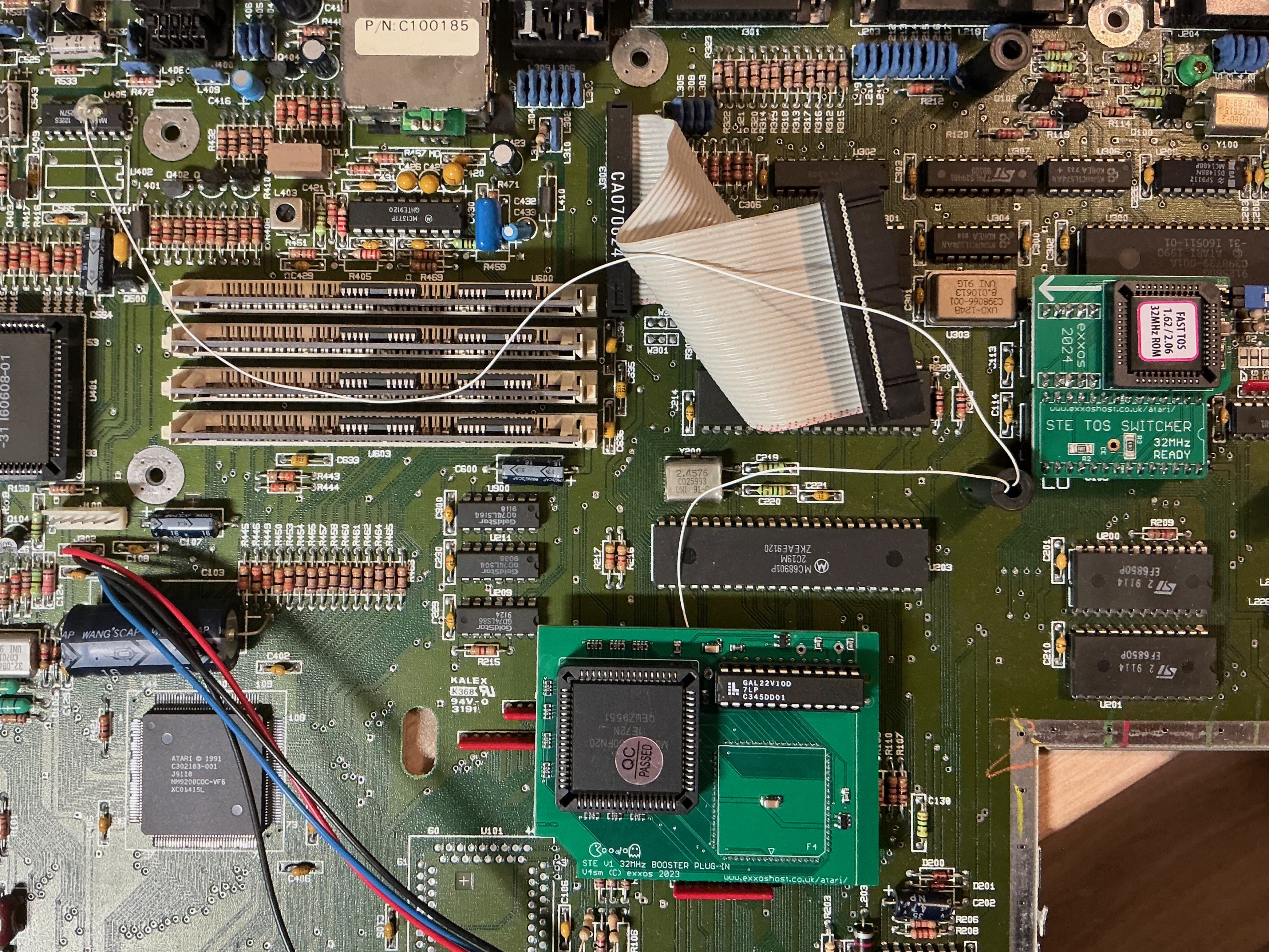
So, (see photo), I've wired up more or less as you've indicated. The only difference being that I've taken both brown and blue to the ground plane (because that was easier, and it should be electronically identical). Having done that, the jumper no longer works (the ST boots to TOS 2, however the jumper is selected) and the accelerator only runs in 8MHz mode). Without the brown and blue wires (red wires as I've done it in real life), it runs in 32MHz mode all the time.

I wonder though, if I leave it in 32MHz / TOS 2 mode, what will I miss out on? What games will not run / run incorrectly? And will any games fail to run or run at the wrong speed if I leave it at 32MHz all the time? In short, am I overthinking this and making it unnecessarily complex?

Thanks again for your great and impressive work!

STMobo2.jpg
STMobo2.jpg (392.47 KiB) Viewed 1411 times
User avatar
exxos
Site Admin
Site Admin
Posts: 28729
Joined: Wed Aug 16, 2017 11:19 pm
Location: UK
Contact:

Re: Installing a CPU upgrade for my STE

Post by exxos »

VMSZealot wrote: Mon Dec 29, 2025 8:46 pm Thanks for your help Exxos - and for all you've done to make these new gizmos to speed up our old gizmos a reality. I love your benchmark software too - excellent work.
:thanksyellow:

The only nit I can find to pick with it is that it doesn't work in MagicMac on my LC475 - it runs, but crashes when the benchmark component is run. I was curious to see how MagicMac might bench compared with the real deal!
Thanks for the report, I don't believe anyone has ever tried it.. I'm at a loss why would crash though because GB6 doesn't really do that much.. Mostly TOS calls.
So, (see photo), I've wired up more or less as you've indicated. The only difference being that I've taken both brown and blue to the ground plane (because that was easier, and it should be electronically identical). Having done that, the jumper no longer works (the ST boots to TOS 2, however the jumper is selected) and the accelerator only runs in 8MHz mode). Without the brown and blue wires (red wires as I've done it in real life), it runs in 32MHz mode all the time.
Because your shorting the jumper down to gnd all the time with the wire.. you should remove the jumper if using the wire.. but wire to gnd AND jumper both forces the lower ROM bank.. so its a point pointless...
I wonder though, if I leave it in 32MHz / TOS 2 mode, what will I miss out on? What games will not run / run incorrectly? And will any games fail to run or run at the wrong speed if I leave it at 32MHz all the time? In short, am I overthinking this and making it unnecessarily complex?
It is impossible to answer what will and won't work.. Some demos may break.. But overall the speed up is for GEM.. Mostly you only get some speed up with 3D games.

@Darklord has a 030 CPU, so its not comparable really with the V1 STE booster.
Thanks again for your great and impressive work!
:thumbup:

Just a small note, we don't allow hotlinking to external sites with images.. I will correct your current one... :)
User avatar
Darklord
Site sponsor
Site sponsor
Posts: 1626
Joined: Wed Sep 20, 2017 1:41 pm
Location: Prestonsburg
Contact:

Re: Installing a CPU upgrade for my STE

Post by Darklord »

exxos wrote: Mon Dec 29, 2025 9:05 pm @Darklord has a 030 CPU, so its not comparable really with the V1 STE booster.
You're absolutely right. Just for the sake of reference though, I did throw in
one video with DOOM running on my Mega STe (16mhz).

One thing that's encouraging is that 2 of those ports are (AFAIK), still being
worked on by the authors. That's good news. :)
Welcome To DarkForce! www.darkforce.org "The Fuji Lives.!"
Atari SW/HW based BBS-Telnet:darkforce-bbs.dyndns.org 1040
User avatar
rubber_jonnie
Site Admin
Site Admin
Posts: 15155
Joined: Thu Aug 17, 2017 7:40 pm
Location: Essex
Contact:

Re: Installing a CPU upgrade for my STE

Post by rubber_jonnie »

One suggestion. The 32Mhz pick off wire could do with being shorter and not running over the SIMMs, ideally around it. Well done otherwise :)
Collector of many retro things!
800XL and 65XE both with Ultimate1MB,VBXL/XE & PokeyMax, SIDE3, SDrive Max, 2x 10¹⁰ cassette, 2x 1050 one with Happy mod, 3x 2600 Jr, 7800 and Lynx II
Approx 20 STs, including a 520 STM, 520 STFMs, 3x Mega ST, MSTE & 2x 32 Mhz boosted STEs
Plus the rest, totalling around 50 machines including a QL, 3x BBC Model B, Electron, Spectrums, ZX81 etc...
VMSZealot
Posts: 14
Joined: Mon Aug 04, 2025 11:02 am

Re: Installing a CPU upgrade for my STE

Post by VMSZealot »

Absolutely. I haven’t tidied up yet. The glue gun is primed and I’ll probably button it up today. It’s been a fun little side project while I wait for some new components to arrive (hopefully today?) for my main project.

I think I’ll leave this at 32MHz and have the ROM selectable. I’ll leave it on TOS 2 with the jumper - and if I start seeing a lot of compatibility issues I’ll think about how to fix it then. My STE is in such perfect condition that I’d rather not cut into the case if at all possible!

Now I just need to get a replica discovery pack sleeve for the box and it’ll be as good new (I have the original disks, manuals, polys - only the sleeve is missing.
Post Reply

Return to “STE V1 SERIES 32MHz BOOSTER”