

Strange it made things worse. But still very useful information to have.
Also switch your scope probe to x1 and measure the righ side of the 62R.. I don't need single.. Just see if audio gets better or worse when you're measuring.
You could also try measure dfb1 clock the same.
The x1 probe will add some small capacitance to the clock signals which will add a very small delay to them which may give indications.
Can all registered uses please login, even just for a few minutes..
It helps build a picture where our "good traffic" is coming from..
Thanks :)
It helps build a picture where our "good traffic" is coming from..
Thanks :)
Falcon + CUBASE AUDIO + SCSI - Experiences?

Re: Falcon + CUBASE AUDIO + SCSI - Experiences?
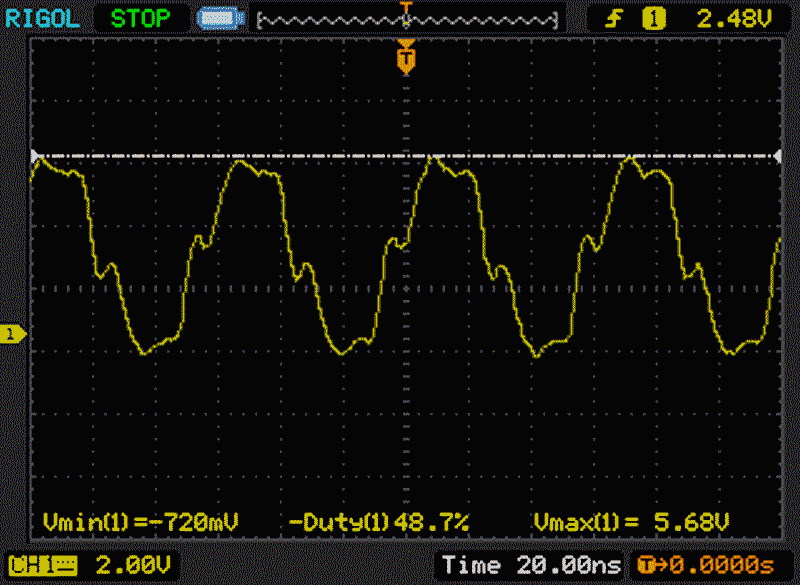
Probed in 1x right side of R62, first with Exp and CPU sharing same clock cycles (like previous step). It did add a little more stability as I could run for a few more minutes prior to digital artifacts. I did get fewer audio pops and it seems more stable.
Then I reconnected Ext clock to Q3 like original patch and probed right R62 again. It felt a little more stable, less so compared to Ext&CPU cycle/sync, and I could add about 2 minutes of playtime prior to digital noise and crackles.
I think adding some capacitance to that area may increase the general stability of the SDMA. What might be a recommended capacitance? 47-100p?
This is still not stable continuance audio, but an improvement as I can use the DFB1X+TTRam and Cubase audio to do some work while reseting Cubase clock whenever there is an issue. I'll need to see that the audio pops here and there is not actually recorded on the audio tracks ...
...
Other than that, any more debugging tips?
Then I reconnected Ext clock to Q3 like original patch and probed right R62 again. It felt a little more stable, less so compared to Ext&CPU cycle/sync, and I could add about 2 minutes of playtime prior to digital noise and crackles.
I think adding some capacitance to that area may increase the general stability of the SDMA. What might be a recommended capacitance? 47-100p?
This is still not stable continuance audio, but an improvement as I can use the DFB1X+TTRam and Cubase audio to do some work while reseting Cubase clock whenever there is an issue. I'll need to see that the audio pops here and there is not actually recorded on the audio tracks
...Other than that, any more debugging tips?
Whomper
Homepage
Electronic Lab
16 Bit: Falcon (DFB1X/14MB/4+8 GB), 1040STFM, Soundpool SPDIF/FA8, Cubase Audio, Cubase 3
8 Bit: 1200XL, 800XL, 2 x 1050, 1025, Fujinet Pro, 2 x 10¹⁰, CX-85, Touch Tablet
Homepage
Electronic Lab
16 Bit: Falcon (DFB1X/14MB/4+8 GB), 1040STFM, Soundpool SPDIF/FA8, Cubase Audio, Cubase 3
8 Bit: 1200XL, 800XL, 2 x 1050, 1025, Fujinet Pro, 2 x 10¹⁰, CX-85, Touch Tablet
Re: Falcon + CUBASE AUDIO + SCSI - Experiences?
If you look at the original V4 installation page, I suggested fitting a 47pF capacitor to the smda clock. But I had reports this was making matters worse for some people so I suggested not to fit it any longer but you could try that.
Like I said originally the DC offset idea like the V2 patch should be tried but I don't think there is any point, because I think it is unlikely that is the problem anyway. A similar idea could be done if you placed something like 470R across the 47pF capacitor. But it decreases DC offset and slows the signal a bit also.
Unfortunately your Falcon seems to fall into one of those categories where nobody knows why none of the clock patches seem to work perfectly. Something else is happening but I don't know what as I'm not able to replicate it here.
My 2 Falcons will basically accept anything you throw at it. But as to why some other falcons seem very problematic, it is difficult to say because nobody has yet sent me a motherboard to diagnose such problems. Something is clearly borderline on your falcon as you get different results which you mentioned seem to be thermal problems but this means something is borderline and that the temperature rise of components is enough to upset it.
My only guess is that some Falcons appears to have worse problems with grounding than other Falcons. As far as I know there is no different styles of motherboard, so likely only component tolerances are at play. But it can be enough.
I can only guess that some clock patches work marginally better than others, or have different faults, because of just how it hits the ground bounce noise across the motherboard. I suspect this is why there are so many variations of the clock patches..Its not the clock patches which are at fault. But of course, it's only a guess which could possibly explain the issues.
The V4 already gives the best clock outputs. The original patch which is a Invertion still has issues for you. Slight changes with scope or run time make things worse. I guess all the clock patches are more treating the symptoms and not the root cause of issues.
I know there's some falcon gerbers about somewhere but does anyone if any exist showing the actual copper flood fill? I just assume the falcon has poor polyfills but nobody knows?
It would probably help as well if you can take clear multiple pictures of your motherboard. Mostly just for future reference to see if there is anything significantly different between your board layout and another like mine... viewforum.php?f=59
Like I said originally the DC offset idea like the V2 patch should be tried but I don't think there is any point, because I think it is unlikely that is the problem anyway. A similar idea could be done if you placed something like 470R across the 47pF capacitor. But it decreases DC offset and slows the signal a bit also.
Unfortunately your Falcon seems to fall into one of those categories where nobody knows why none of the clock patches seem to work perfectly. Something else is happening but I don't know what as I'm not able to replicate it here.
My 2 Falcons will basically accept anything you throw at it. But as to why some other falcons seem very problematic, it is difficult to say because nobody has yet sent me a motherboard to diagnose such problems. Something is clearly borderline on your falcon as you get different results which you mentioned seem to be thermal problems but this means something is borderline and that the temperature rise of components is enough to upset it.
My only guess is that some Falcons appears to have worse problems with grounding than other Falcons. As far as I know there is no different styles of motherboard, so likely only component tolerances are at play. But it can be enough.
I can only guess that some clock patches work marginally better than others, or have different faults, because of just how it hits the ground bounce noise across the motherboard. I suspect this is why there are so many variations of the clock patches..Its not the clock patches which are at fault. But of course, it's only a guess which could possibly explain the issues.
The V4 already gives the best clock outputs. The original patch which is a Invertion still has issues for you. Slight changes with scope or run time make things worse. I guess all the clock patches are more treating the symptoms and not the root cause of issues.
I know there's some falcon gerbers about somewhere but does anyone if any exist showing the actual copper flood fill? I just assume the falcon has poor polyfills but nobody knows?
It would probably help as well if you can take clear multiple pictures of your motherboard. Mostly just for future reference to see if there is anything significantly different between your board layout and another like mine... viewforum.php?f=59
Re: Falcon + CUBASE AUDIO + SCSI - Experiences?
@whomper
So looking at your revision
https://www.exxosforum.co.uk/forum/view ... 95#p132341
Most like mine are C/D so likely something has changed in your revision which isn't a currently know fault.
I looked again and out2 seems a lot worse than on my machine..https://www.exxosforum.co.uk/atari/last ... /forig.png so can you confirm you had the 100pF added under the fpu on that reading?
I think this was your V4 results..
https://www.exxosforum.co.uk/forum/view ... 10#p132203
It probably be best to do one thing at a time.. Put V4 back in. Test audio and sdma clock, add 47pf to right side of sdma 62R resistor to gnd as per install page.. Repeat audio test and scope clock.. Also try 470R across 47pF or try resistor on its own. If that helps it maybe worth trying V3 patch. It solves DC offset issues and also has delay option for sdma.
Do this without DFB1X because your adding another clocked circuit in the mix which is confusing things at this point.
Also scope the left pad on the V4 as its the input clock.
Also next to V4.1 text is small capacitor.. Scope the left side as it's the buffered master clock..
Also I don't know where you are grounding your scope? Using the big cap gnd next to PSU connector will likely show different from using the Ajax gnd.
If you use x1 probe on all clocks, see if it changes anything. X1 adds capacitance. So maybe 1 clock is more sensitive than another.. It may give clues.
That sent you a version 3 today as that one may solve the DC offset problem better and it also has a adjustable delay for the SDMA line. It is also a inverting type which is more like your original patch, but as you have problems with inverting and nothing, then I'm not really sure that is the root cause of the problem. But it is relatively simple once you are set up with version 3 to just swap to the version 4 board to see if the inversion is a factor or not.
If the out2 is still bad and nothing works with v4 still. You may have to try routing new clock wires. But I can only guess it might be a factor with worse reflections on your board. But as sdma clock looks good.. It shouldn't really matter so much what the driver sees.. But anything is possible at this point because everything is a unknown.. So it's difficult to do remote diagnostics on this thing and could go on for some weeks.
So looking at your revision
https://www.exxosforum.co.uk/forum/view ... 95#p132341
Most like mine are C/D so likely something has changed in your revision which isn't a currently know fault.
I looked again and out2 seems a lot worse than on my machine..https://www.exxosforum.co.uk/atari/last ... /forig.png so can you confirm you had the 100pF added under the fpu on that reading?
I think this was your V4 results..
https://www.exxosforum.co.uk/forum/view ... 10#p132203
It probably be best to do one thing at a time.. Put V4 back in. Test audio and sdma clock, add 47pf to right side of sdma 62R resistor to gnd as per install page.. Repeat audio test and scope clock.. Also try 470R across 47pF or try resistor on its own. If that helps it maybe worth trying V3 patch. It solves DC offset issues and also has delay option for sdma.
Do this without DFB1X because your adding another clocked circuit in the mix which is confusing things at this point.
Also scope the left pad on the V4 as its the input clock.
Also next to V4.1 text is small capacitor.. Scope the left side as it's the buffered master clock..
Also I don't know where you are grounding your scope? Using the big cap gnd next to PSU connector will likely show different from using the Ajax gnd.
If you use x1 probe on all clocks, see if it changes anything. X1 adds capacitance. So maybe 1 clock is more sensitive than another.. It may give clues.
That sent you a version 3 today as that one may solve the DC offset problem better and it also has a adjustable delay for the SDMA line. It is also a inverting type which is more like your original patch, but as you have problems with inverting and nothing, then I'm not really sure that is the root cause of the problem. But it is relatively simple once you are set up with version 3 to just swap to the version 4 board to see if the inversion is a factor or not.
If the out2 is still bad and nothing works with v4 still. You may have to try routing new clock wires. But I can only guess it might be a factor with worse reflections on your board. But as sdma clock looks good.. It shouldn't really matter so much what the driver sees.. But anything is possible at this point because everything is a unknown.. So it's difficult to do remote diagnostics on this thing and could go on for some weeks.
Re: Falcon + CUBASE AUDIO + SCSI - Experiences?
Thanks for the debugging tip. I'll reinstall V4 and scope the recommended sequence. I did install 47R across GND and 62R with legacy clock and DFB1X but that did not change. I can report that without DFB1X legacy clock works well with Cubase Audio. Issues arise when DFB1X is installed.
I'll get back to opening up the Falcon in a few weeks once I complete the project I'm working on.
I'll get back to opening up the Falcon in a few weeks once I complete the project I'm working on.
Whomper
Homepage
Electronic Lab
16 Bit: Falcon (DFB1X/14MB/4+8 GB), 1040STFM, Soundpool SPDIF/FA8, Cubase Audio, Cubase 3
8 Bit: 1200XL, 800XL, 2 x 1050, 1025, Fujinet Pro, 2 x 10¹⁰, CX-85, Touch Tablet
Homepage
Electronic Lab
16 Bit: Falcon (DFB1X/14MB/4+8 GB), 1040STFM, Soundpool SPDIF/FA8, Cubase Audio, Cubase 3
8 Bit: 1200XL, 800XL, 2 x 1050, 1025, Fujinet Pro, 2 x 10¹⁰, CX-85, Touch Tablet


Re: Falcon + CUBASE AUDIO + SCSI - Experiences?
Just out of interest, does it all work well if DFB1X is run in 16MHz mode?
BW
BW
DFB1 Open source 50MHz 030 and TT-RAM accelerator for the Falcon
Smalliermouse ST-optimised USB mouse adapter based on SmallyMouse2
FrontBench The Frontier: Elite 2 intro as a benchmark
Smalliermouse ST-optimised USB mouse adapter based on SmallyMouse2
FrontBench The Frontier: Elite 2 intro as a benchmark
Re: Falcon + CUBASE AUDIO + SCSI - Experiences?
How does one do that? Is it the Flash jumper?Badwolf wrote: Thu Aug 14, 2025 1:59 pm Just out of interest, does it all work well if DFB1X is run in 16MHz mode?
Whomper
Homepage
Electronic Lab
16 Bit: Falcon (DFB1X/14MB/4+8 GB), 1040STFM, Soundpool SPDIF/FA8, Cubase Audio, Cubase 3
8 Bit: 1200XL, 800XL, 2 x 1050, 1025, Fujinet Pro, 2 x 10¹⁰, CX-85, Touch Tablet
Homepage
Electronic Lab
16 Bit: Falcon (DFB1X/14MB/4+8 GB), 1040STFM, Soundpool SPDIF/FA8, Cubase Audio, Cubase 3
8 Bit: 1200XL, 800XL, 2 x 1050, 1025, Fujinet Pro, 2 x 10¹⁰, CX-85, Touch Tablet
Re: Falcon + CUBASE AUDIO + SCSI - Experiences?
On DFB1 (not X), it's OPTION1, I think. The first on the left. It will deny permission for the clock change upwards.
It's possible that's been removed in the -X version, but easy to test by jumpering it and running the Integer Division score on Gembench 6.
BW
DFB1 Open source 50MHz 030 and TT-RAM accelerator for the Falcon
Smalliermouse ST-optimised USB mouse adapter based on SmallyMouse2
FrontBench The Frontier: Elite 2 intro as a benchmark
Smalliermouse ST-optimised USB mouse adapter based on SmallyMouse2
FrontBench The Frontier: Elite 2 intro as a benchmark
Re: Falcon + CUBASE AUDIO + SCSI - Experiences?
Hi,
I'm back to tinker with my Falcon, DFB1X and clock patch v3 (thanks @exxos).
In order to properly progress with this patch and make sure we have enough scoping on current and v3 patched clock plus relevant on board additions, what's the right sequence of actions that I should take and which scopes to screen capture?
As a recap, my Falcon works with legacy (clock 1.2 IMO) clock patch and Cubase audio relatively stable, but not with DFB1X.
I'ld rather start the clock upgrade afresh as I'm already confused as to what worked and in what way
I'm back to tinker with my Falcon, DFB1X and clock patch v3 (thanks @exxos).
In order to properly progress with this patch and make sure we have enough scoping on current and v3 patched clock plus relevant on board additions, what's the right sequence of actions that I should take and which scopes to screen capture?
As a recap, my Falcon works with legacy (clock 1.2 IMO) clock patch and Cubase audio relatively stable, but not with DFB1X.
I'ld rather start the clock upgrade afresh as I'm already confused as to what worked and in what way
Whomper
Homepage
Electronic Lab
16 Bit: Falcon (DFB1X/14MB/4+8 GB), 1040STFM, Soundpool SPDIF/FA8, Cubase Audio, Cubase 3
8 Bit: 1200XL, 800XL, 2 x 1050, 1025, Fujinet Pro, 2 x 10¹⁰, CX-85, Touch Tablet
Homepage
Electronic Lab
16 Bit: Falcon (DFB1X/14MB/4+8 GB), 1040STFM, Soundpool SPDIF/FA8, Cubase Audio, Cubase 3
8 Bit: 1200XL, 800XL, 2 x 1050, 1025, Fujinet Pro, 2 x 10¹⁰, CX-85, Touch Tablet
Re: Falcon + CUBASE AUDIO + SCSI - Experiences?
@whomper I'm not sure which clock patch you currently have fitted ?
In any case the tests would just be to simply scope the SDMA, FPU, EXP clocks at "destination" (not on on the clock patch board).
Fit V3, and do the same tests and test what software fails.
Do tests without DFB1X as its just adding a layer of confusion at this point.
In any case the tests would just be to simply scope the SDMA, FPU, EXP clocks at "destination" (not on on the clock patch board).
Fit V3, and do the same tests and test what software fails.
Do tests without DFB1X as its just adding a layer of confusion at this point.