Page 1 of 2
Exxos Diagnostic Cartridge Issue - Jumper selections
Posted: 23 May 2024 09:06
by MacTech05
Exxos,
I followed the chart layout on the cartridge PCB to set the jumpers for my ST (1040 STFM). The jumpers I selected are in the photo below:

- Cart Jumpers ST.jpg (368.3 KiB) Viewed 1565 times
The jumpers, based on chart on the PCB do not seem to track with set it up. The charts says the following:
First row pins left to right: 1st pin open, 2nd & 3rd pins jumpered, 4th & 5th pins jumpered, 6th pin open, diagram shows 7th & 8th pin jumpered. However, there is no 7th pin. So, what do I do. I tried to use the cartridge with jumpers set as shown in the attached photo, when I turned the ST on, it went into a constant restart cycle. I powered the ST off, removed the cartridge, and turned the ST on again with a SysInfo disk in the floppy. It got to a desktop, but immediately restarted. It continued to restart as long as the ST was powered on. Went through the process (cartridge still removed) a few more times, but same result, constant restart cycle. By the way, the cartridges was plugged in with the chips facing up.
All was well and I had been using the ST for a while through the day, before I tried the cartridge, and worked perfectly. I tried the cartridge because I wanted to test the keyboard to make sure all of the keys were working properly. But now the 1040 STFM is unusable.
Thank you.
Randy
Re: Exxos Diagnostic Cartridge Issue
Posted: 23 May 2024 09:13
by exxos
Your taking the alignment of the printed jumpers to literally. There wasn't room on the PCB to shift the right hand pins downwards multiple times.
You just need to move the jumper link 1 row down then it matches the printed layout.

- dc.jpg (136.56 KiB) Viewed 1558 times
Re: Exxos Diagnostic Cartridge Issue
Posted: 23 May 2024 09:17
by rubber_jonnie
From what I can see you have one of the jumpers set wrong.
Look at the bottom row as per your picture, the jumper should be in the middle for a standard ST, bridging the two pins vertically. The other jumpers are fine.
Re: Exxos Diagnostic Cartridge Issue - Jumper selections
Posted: 23 May 2024 21:02
by MacTech05
Exxos,
Well, this is not the first time I have been told I am too literal. Par for the course, I guess. Now the jumper settings make sense. I will change the jumpers.
However, I am still concerned about the fact that after startup with cartridge installed the STFM then began a constant restart (Resetting) cycle. Of bigger concern is after I turned off the STFM, removed the cartridge, then started up again, the constant cycle of restarts (Resets) continued without stopping until I powered down. After that, every time I turned on the STFM, it went into the repeated restart cycle.
Could the jumper settings I used caused the problem? If the constant restart cycle had stopped once I removed the cartridge, I would definitely attribute the problem to the incorrect jumper settings on the cartridge. But the constant restart cycle issue was still present when I powered up the STFM with the cartridge removed. Any suggestions?
I will change the jumper settings to the correct ones and try again and see what happens. I will also clean the cartridge slot contacts with IPA prior to inserting the cartridge. If it continues with the constant restart cycle, I will try again with the null modem cable I got from you and connect via serial port to my PC and use a Terminal Emulation program in hopes the readout from the cartridge will be displayed in the Terminal Emulation program on my PC. That is correct procedure, correct?
Thank you,
Randy
Re: Exxos Diagnostic Cartridge Issue - Jumper selections
Posted: 23 May 2024 21:40
by stephen_usher
The jumper setting merely select which part of the ROM is being accessed and can't have any effect upon the ST.
However, check that you've not accidentally bent some of the cartridge port pins. Address or data lines could be touching each other causing the system not to boot.
Re: Exxos Diagnostic Cartridge Issue - Jumper selections
Posted: 23 May 2024 22:10
by MacTech05
stephen_usher
Thank you for that suggestion. I will check the cartridge slot pins and clean with a little alcohol.
Thanks,
Randy
Re: Exxos Diagnostic Cartridge Issue - Jumper selections
Posted: 24 May 2024 10:12
by exxos
MacTech05 wrote: 23 May 2024 21:02
But the constant restart cycle issue was still present when I powered up the STFM with the cartridge removed. Any suggestions?
Sounds more like a PSU issue to me. Have to at least recapped the PSU ? Changed the caps in the reset circuit ? Re-seated and cleaned the chips in sockets ? If you have not done those things then you are not going to get anywhere at all with the diagnostic cartridge.
Re: Exxos Diagnostic Cartridge Issue - Jumper selections
Posted: 24 May 2024 19:07
by MacTech05
Exxos,
I already recapped the PSU. Also, upgraded the TOS ROMs to Rainbow TOS. I had to install 4 additional TOS ROM sockets, since the Rainbow TOS ROM chips I had was the 6 TOS ROM version. I also reflowed the solder on the mouse/joystick DB-9 ports on the bottom of the keyboard. I will reseat the chips that can be removed and reseated. I have not located the caps for the reset circuit. I have not found schematics for my specific 1040 STFM motherboard model. Photos of my STFM are below.
After the upgrades I performed, I used the ST for a bit. I ran SysInfo to verify the upgrade TOS was properly recognized. Ran a couple of other programs just to be certain all was ok. Since I wanted to test the keyboard to ensure all of the key worked properly and did not have a keyboard test program, I plugged in the Exxos Diagnostic Cartridge. I was unaware I had arranged the jumpers on the Exxos Cartridge at that time. So, I started up the STFM and the restart/reset cycle started immediately. It continued to restart/reset until it displayed bombs (4 as I recall) So, I turned of the ST, removed the cartridge, the turned on the ST with a SysInfo floppy disk. It looked like the ST was going to start up, as I saw the desktop and the SysInfo window from the floppy disk pop up, then the screen blinked and reset. The reset continued without stopping until I turned of the ST. However, there were zero bombs. I shut down and restarted a few more times, with same result, continuous resetting until I powered off the ST.
I will disassemble the STFM again and check all of the cartridge slot pins to make sure the solder connections are solid as well as check to make sure none of the cartridge socket pins are bent.
Do think the Exxos Diagnostic Cartridge is ok? Still usable, since I have arranged the jumpers correctly, per your previous photo.
Thank you,
Randy
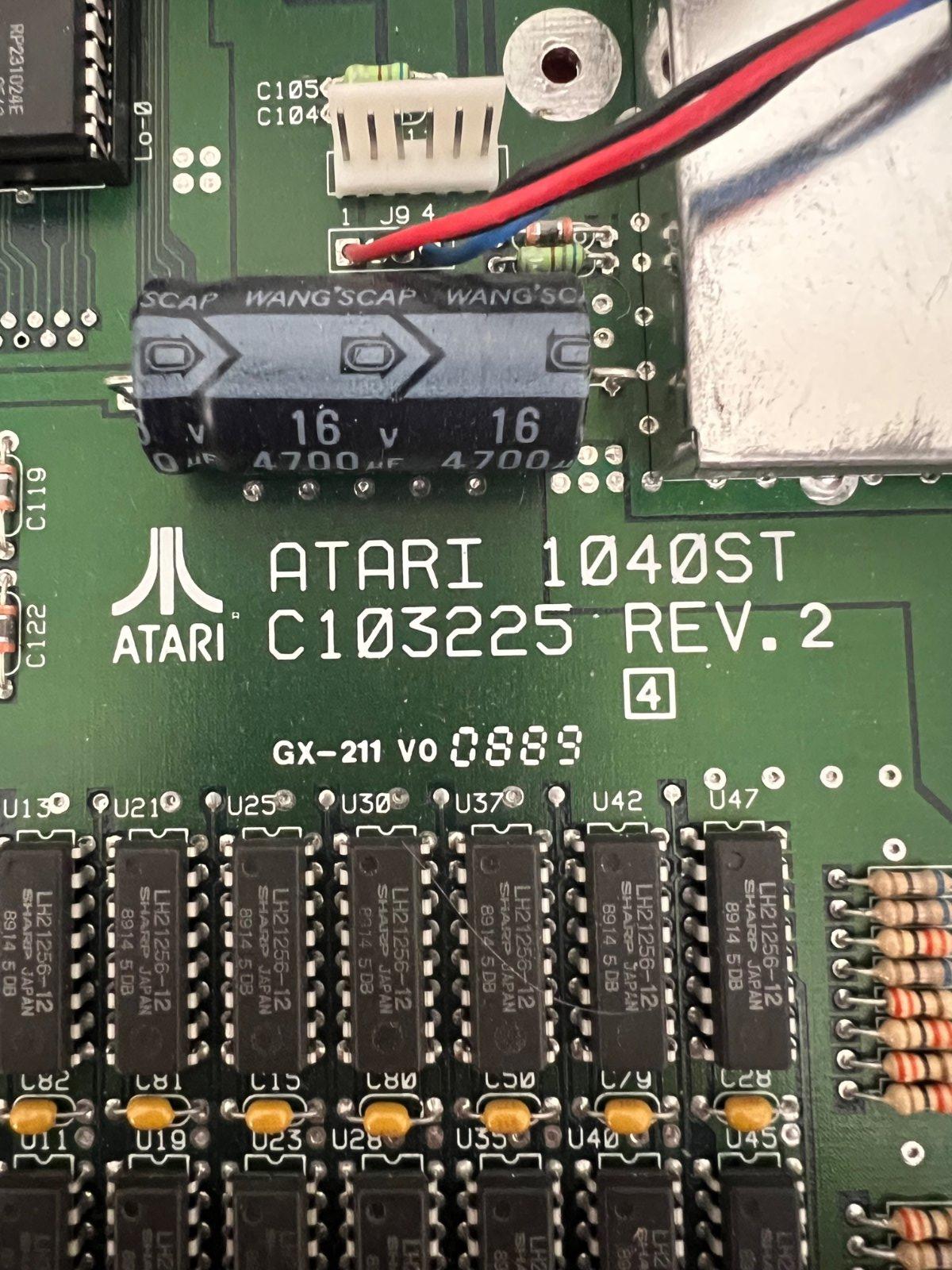
- IMG_7683.jpg (312.02 KiB) Viewed 1427 times

- IMG_7469.jpg (497.55 KiB) Viewed 1427 times
Re: Exxos Diagnostic Cartridge Issue - Jumper selections
Posted: 24 May 2024 21:18
by rubber_jonnie
Can I ask, which way up did you plug the cartridge in? Chips up or down?
Re: Exxos Diagnostic Cartridge Issue - Jumper selections
Posted: 24 May 2024 21:22
by MacTech05
rubber_jonnie,
I plugged the cartridge in, chips up.