Page 1 of 2
Help to configure ClassicWB3.9 with TF330
Posted: 18 Jan 2020 00:22
by hardgb
I'm configuring ClassicWB3.9 for the TF330, but I have two problems.
1st I can't remove the DF0 icon
2nd I cannot insert the CD to play automatically and the icon appears on the desktop.
Note: forgive me my English (translate):help
Re: Help to configure ClassicWB3.9 with TF330
Posted: 18 Jan 2020 00:40
by terriblefire
Im by no means an expert here... but
1. to remove DF0:
go to Devs:DosDrivers and remove DF0 & DF0.INFO
2. to setup CD0;
move or copy CD0 & CD0.INFO from Sys:Storage/Devs/CD0 to Devs:DosDrivers
Maybe others will know more
Re: Help to configure ClassicWB3.9 with TF330
Posted: 18 Jan 2020 02:06
by hardgb
I'm not finding DF0.
Re: Help to configure ClassicWB3.9 with TF330
Posted: 18 Jan 2020 02:14
by matt020
Check startup sequence for "addbuffers df0:"
if it is there, add a semicolon to stop it from loading.
;addbuffers df0:
and tell me if that works?
Re: Help to configure ClassicWB3.9 with TF330
Posted: 18 Jan 2020 03:26
by hardgb
I didn't find any reference to DF0 in the startup-sequence. I believe the closest thing to it was this
Re: Help to configure ClassicWB3.9 with TF330
Posted: 18 Jan 2020 06:13
by supaduper
What do you mean by configuring the CD to play automatically ?, do you mean a CD32 game Cd to play on Boot up, if yes then it will not work as there is a bug on the TF330 the moment which means most CD32 games will not boot automatically ..or do you mean something else ?
I am also puzzled by the DFO error as for it to appear it would have to be in the Startup Seq as mentioned for it to show up on the Workbench
I have a similar CWB OS 3_9 image to you so I will try it out and see if I get the same errors
Also your images are not showing up in your post :)
Re: Help to configure ClassicWB3.9 with TF330
Posted: 18 Jan 2020 09:37
by terriblefire
supaduper wrote: 18 Jan 2020 06:13
What do you mean by configuring the CD to play automatically ?, do you mean a CD32 game Cd to play on Boot up,
Wasnt aware of this?
Re: Help to configure ClassicWB3.9 with TF330
Posted: 18 Jan 2020 09:44
by supaduper
It`s just the `Disable` bug Steve that I am telling him about, where the removing of the Jumper does not disable the TF330 from the CD32 meaning some CD will boot some others not
Re: Help to configure ClassicWB3.9 with TF330
Posted: 18 Jan 2020 09:46
by terriblefire
supaduper wrote: 18 Jan 2020 09:44
It`s just the `Disable` bug Steve that I am telling him about, where the removing of the Jumper does not disable the TF330 from the CD32 meaning some CD will boot some others not
Ah I read it as the CD32 would not boot a game from CD with a TF330 in. No worries.
Re: Help to configure ClassicWB3.9 with TF330
Posted: 18 Jan 2020 12:45
by supaduper
To stop the DF0 unreadable icon appearing on WorkBench edit your Startup-Sequence as I have done by adding this line before the first Setpach command
SetPatch NOROMUPDATE QUIET
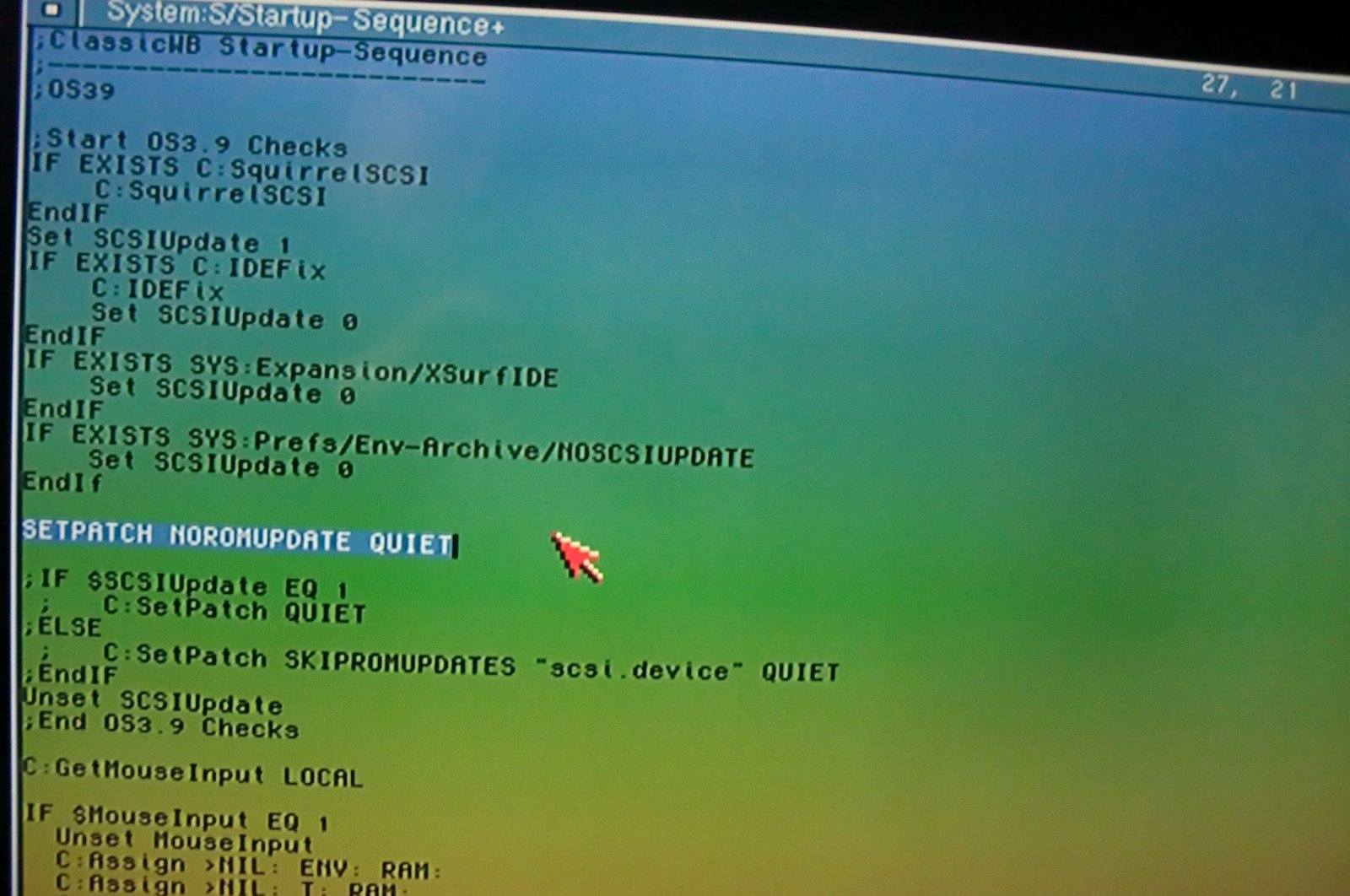
- DF0 unreadable fix.jpg (204.46 KiB) Viewed 5257 times
!Message from: Moderator
@supaduper, we have placed your attachments in-line so they display correctly in your post. Here's the
how-to guide.