Page 3 of 4
Re: Exxos's QIDI X-PLUS 3 adventure
Posted: 07 Aug 2024 15:41
by agranlund
stephen_usher wrote: 06 Aug 2024 15:24
Most 3D printer buyers until recently have been tinkerers and their hobby is mostly fixing the printers and making benchy models it seems.
The Bambu Lab printers were game changers in that they were designed to be consumer items, to be taken out of the box and the first print finished within an hour by a novice. Prusa et al are racing to catch up.
Sorry if this is off topic a bit but that got me intrigued.
I’ve been scared off 3d printers for the reason you mentioned. I have this perception that it’s necessary to get to know and tinker with them like a hobby when all I’d like one for is as a tool just like my inkjet paper printer.
Are there models out there for dumb consumers like me?
Re: Exxos's QIDI X-PLUS 3 adventure
Posted: 07 Aug 2024 15:56
by stephen_usher
agranlund wrote: 07 Aug 2024 15:41
Sorry if this is off topic a bit but that got me intrigued.
I’ve been scared off 3d printers for the reason you mentioned. I have this perception that it’s necessary to get to know and tinker with them like a hobby when all I’d like one for is as a tool just like my inkjet paper printer.
Are there models out there for dumb consumers like me?
Yes, the Bambu Lab printers are pretty well take out the box and go. The A1 is a very basic, open frame "bed slinging" printer but "just works". The mid-range is the P1S which is an all-enclosed X/Y printer. The X1 and X1 Carbon (has re-enforced hot end for abrasive filaments) is like the P1S but has a metal enclosure and a larger screen.
The A1 has the "AMS lite" filament auto feed system, the other two have the fully enclosed "AMS" system.
If you want a work horse printer but don't need a big screen etc. go for the P1S with AMS unit (which is completely worth it).
The only maintenance I've had to do on my X1 Carbon since last Christmas when I got it has been to re-grease the Z screws and change the dehumidifier gel in the AMS unit.
Re: Exxos's QIDI X-PLUS 3 adventure
Posted: 07 Aug 2024 16:08
by Steve
Yes and I can vouch for Prusa. Our Prusa MK3S here at work is so straight-forward to use. The open source software, Prusa Slicer, is also extremely easy to use and allows you to quickly & easily prepare a 3D print. I'm a total newbie and I've already been experimenting with three different kinds of materials.
Re: Exxos's QIDI X-PLUS 3 adventure
Posted: 07 Aug 2024 21:18
by exxos
This is soooooo cool. Load of toys!

- 2.PNG (266.08 KiB) Viewed 1274 times
So with Klipper I can literally just change what I want, save and reboot, and done!! With Marlin it took 3 months of constant fighting just to get VSstudio setup to compile the code!! None of that BS now!! :yay:

- 1.PNG (204.24 KiB) Viewed 1274 times
The bed looks well wonky! But looks flat to the eye :lol:
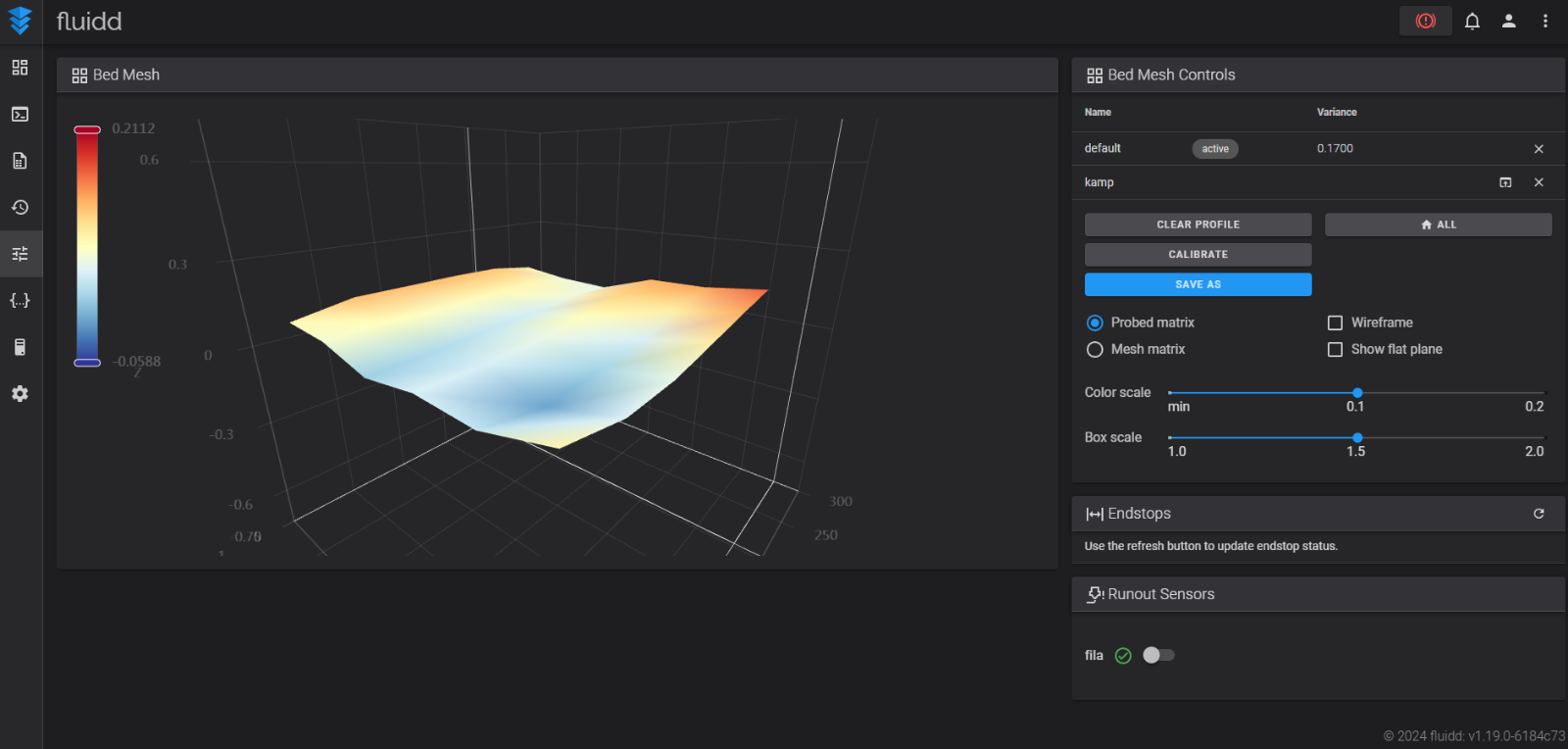
- 3.PNG (203.14 KiB) Viewed 1274 times
Re: Exxos's QIDI X-PLUS 3 adventure
Posted: 08 Aug 2024 09:40
by exxos
Be interesting if they actually do this or not...

- Capture.PNG (15.29 KiB) Viewed 1246 times
Though one reason I purchased the printer is they do seem to listen to their customers and take action, which is a rarity these days.
Re: Exxos's QIDI X-PLUS 3 adventure
Posted: 08 Aug 2024 11:00
by Icky
exxos wrote: 08 Aug 2024 09:40
Be interesting if they actually do this or not...
Though one reason I purchased the printer is they do seem to listen to their customers and take action, which is a rarity these days.
Wait till they receive your 100th issue ticket. I think they will be quiet then :)
Re: Exxos's QIDI X-PLUS 3 adventure
Posted: 08 Aug 2024 13:54
by stephen_usher
Icky wrote: 08 Aug 2024 11:00
Wait till they receive your 100th issue ticket. I think they will be quiet then :)
:excited: :dizzy:
You know
@exxos too well. ;-)
Re: Exxos's QIDI X-PLUS 3 adventure
Posted: 08 Aug 2024 15:47
by exxos
Icky wrote: 08 Aug 2024 11:00
Wait till they receive your 100th issue ticket. I think they will be quiet then :)
:chairsmack:
stephen_usher wrote: 08 Aug 2024 13:54
You know @exxos too well. ;-)
:chairsmack:
They haven't haven't mentioned anything about the temperature problem yet, but I have found if I "cool" to 40c, the display correctly behaves, so it only seems to "get stuck" on zero..
Have mostly been "fine tuning" so it calibrates faster etc today.
I also found some PLA which came with my original I3 printer which must have been a decade ago, and it prints absolutely fine still :shock: It's not even been enclosed or anything just lay my workshop floor.
I'm using it to print some 030 PGA "carrier cases". I bulk purchase some legitimately brand-new 030 CPUs as I am tied with dealing with bent pins on the ones from China and some don't work anyway! I also don't fancy cutting loads of foam, but is not really the best for the fine pins anyway. So I designed my own little boxes things to protect the pins.. Kind of like the trays they come in but individual "boxes". Only takes 2 mins to print one, so I should be able to churn off a lot of them very quickly :)

- Capture.PNG (40.94 KiB) Viewed 1206 times
Re: Exxos's QIDI X-PLUS 3 adventure
Posted: 08 Aug 2024 16:10
by exxos
Here we go...
What could go wrong..
:hide:

- Capture.PNG (202.58 KiB) Viewed 1200 times
Re: Exxos's QIDI X-PLUS 3 adventure
Posted: 08 Aug 2024 17:32
by exxos
A hour later :)
Looks like I need to tweak the bed locations and dimensions next..
These are printed really fast as quality isn't really a issue for a "throw-away" item. I mean 2 mins per box is pretty good IMO :) Supposedly 10,000mm/min or 600,000mm per second :lol: :roll: I wonder what its limited by firmware with as I can see it getting those speeds somehow.

- IMG_2591.JPG (375.01 KiB) Viewed 1192 times