Page 15 of 34
Re: Sporniket's log on hardware stuff
Posted: 08 Jul 2022 23:22
by ijor
sporniket wrote: 08 Jul 2022 22:47
I am not sure of the directionality of some signals, though..
I can probably fill this gap. Which ones?
Re: Sporniket's log on hardware stuff
Posted: 09 Jul 2022 06:17
by sporniket
Thanks @ijor .
First, I made the pins for /AS, /UDS, /LDS, /DTACK and R/W bidirectionnal, but now that I write that, I realize there is no pins to request bus mastering (BR/BG/BGACK) so I guess they are in fact input only ?
Then, I supposed that the pins for /RAM,/DMA,/DEV,/VSYNC and /DE all comes from the GLUE, so I made them inputs, am I right ?
Re: Sporniket's log on hardware stuff
Posted: 09 Jul 2022 11:31
by ijor
sporniket wrote: 09 Jul 2022 06:17
First, I made the pins for /AS, /UDS, /LDS, /DTACK and R/W bidirectionnal, but now that I write that, I realize there is no pins to request bus mastering (BR/BG/BGACK) so I guess they are in fact input only ?
They are not bidirectional. But DTACK is output, not input.
Then, I supposed that the pins for /RAM,/DMA,/DEV,/VSYNC and /DE all comes from the GLUE, so I made them inputs, am I right ?
That's correct. Technically, VSYNC can come from GLUE or externally from the monitor port. Remember that the ST supports external sync.
Re: Sporniket's log on hardware stuff
Posted: 09 Jul 2022 16:16
by frank.lukas
sporniket wrote: 27 Feb 2022 17:53
DISCLAIMER : my installation will be unconventionnal, as I have to get enough clearance to install an IDE extension provided by @frank.lukas. And with the original big cap, I have a problem when trying to install the extension with a Compact Flash adaptor and said Compact Flash card :

What are your problems with my STE IDE Interface ?
Use HDDriver to partition your CF card. 500MB for each partition.
Re: Sporniket's log on hardware stuff
Posted: 09 Jul 2022 20:07
by sporniket
@frank.lukas for now I guess I don't have a problem with the hardware. About the fitting, the clearance problem is solved once the big capacitor has been replaced by an alternative positioned more toward the left, to leave space for the whole thing (the interface + the compact flash adapter + the compact flash)
I also have to put the jumper for the powering, I did not understand whether it is J1 or J2 ?
For now I am stuck with creating an image disk to copy into the compact flash. (I also admit that I did not try a lot of attempt) I don't have Hdd driver and my only attempt with formatting an image using AHDI did not work.
Re: Sporniket's log on hardware stuff
Posted: 09 Jul 2022 21:42
by frank.lukas
sporniket wrote: 09 Jul 2022 20:07
I also have to put the jumper for the powering, I did not understand whether it is J1 or J2 ?
one pin goes to ide port pin20 and the other is vcc so you have to bridges the two with a jumper to power the cf adapter
You can use ahdi 6 to set the cf card up. Use hdx to partition the card ...
Re: Sporniket's log on hardware stuff
Posted: 10 Jul 2022 08:03
by sporniket
Thank you
@frank.lukas. Unless unforeseen events, I will have some alone time very soon, I will do my best to complete the setting.
@ijor, I did fix the directionnality, thank you.

- subsheet_100-U15–MMU ; U22-23-26-27–Bus isolator.png (398.07 KiB) Viewed 2074 times
edit : typo
Re: Sporniket's log on hardware stuff
Posted: 10 Jul 2022 09:13
by sporniket
This time, I try to advance the PCB and the schematic at the same time...

- Capture d’écran du 2022-07-10 10-06-03.png (181.22 KiB) Viewed 2069 times

- Capture d’écran du 2022-07-10 10-06-43.png (67.96 KiB) Viewed 2069 times
Re: Sporniket's log on hardware stuff
Posted: 12 Jul 2022 20:49
by sporniket
Ready for the next part of the schematic...

- Capture d’écran du 2022-07-12 21-29-51.png (95.59 KiB) Viewed 2039 times
Having the scanned pcb is helpful to have some approximative guidelines (I must average between the top scan and the bottom scan, and I still need the original scan to distinguish better how the traces are going : the vectorisation loses a lot of details.
Re: Sporniket's log on hardware stuff
Posted: 22 Jul 2022 21:57
by sporniket
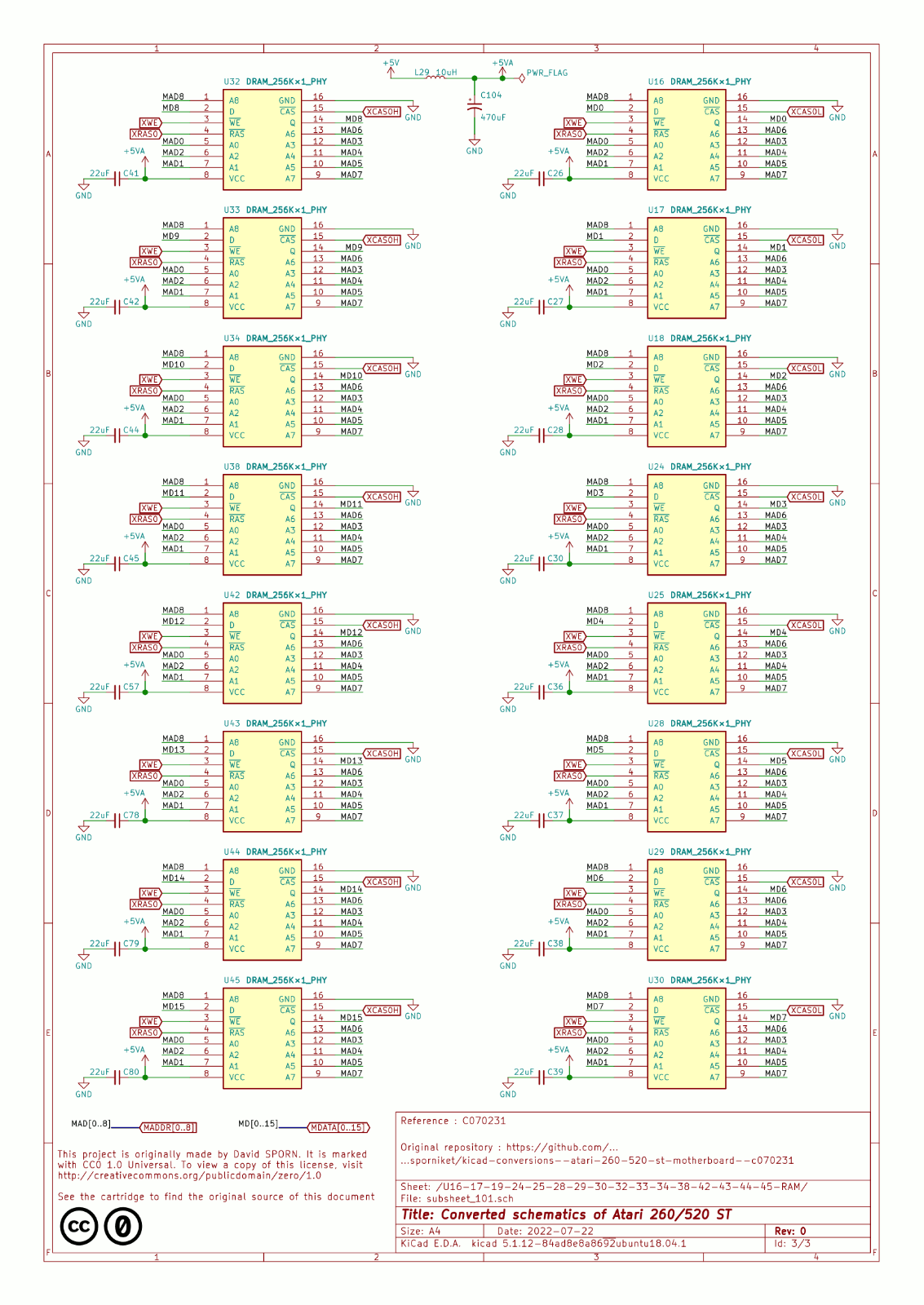
Next subsheet, the RAM chips. I succeeded to pack them all.
- subsheet_101-U16-17-19-24-25-28-29-30-32-33-34-38-42-43-44-45-RAM.png (594.02 KiB) Viewed 1966 times