Page 1 of 1
Falcon localization settings, where?
Posted: 10 Jun 2021 04:29
by jacolover
Hi all, looking to change localization for my Falcon from German to US. I have TOS 4.01. I have been told that all language settings are contained in the TOS rom for the Falcon, and that all I need is to set the localization by ?what? Some said a CPX module but don't see any in my setup, I don't see any way to change my localization on this Falcon. Please help! Thanks!
Re: Falcon localization settings, where?
Posted: 10 Jun 2021 05:08
by sety
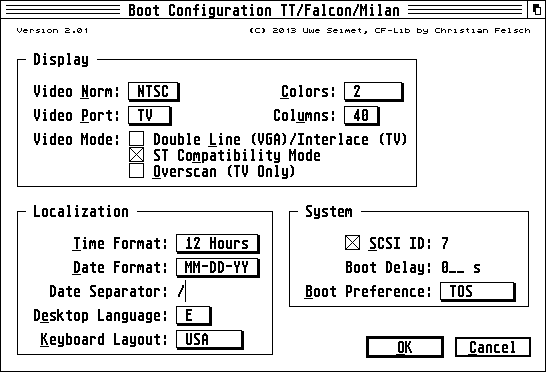
You can use an nvram tool like bootconf. Some control panels may also work.
Re: Falcon localization settings, where?
Posted: 10 Jun 2021 08:22
by exxos
Think you need the language disk to change settings.
Re: Falcon localization settings, where?
Posted: 10 Jun 2021 16:26
by jacolover
Thanks guys, I will give that a try!
Re: Falcon localization settings, where?
Posted: 11 Jun 2021 00:50
by jacolover
OK, found the language disk and there is indeed a config file that I can use to set the language and keyboard, only problem is that when I reboot to get the settings I lose the hard drive boot sequence and have no access to the hard drive, can't even use "install devices" to get back the hard drive. A bit perplexed with this one, thanks.
Re: Falcon localization settings, where?
Posted: 11 Jun 2021 02:25
by exxos
Can't remember if its got Atari's hard drive driver on it ? Are you rebooting with the floppy inserted still after changing settings ?
Re: Falcon localization settings, where?
Posted: 11 Jun 2021 08:48
by frank.lukas
Re: Falcon localization settings, where?
Posted: 11 Jun 2021 09:48
by Badwolf
If your NVRAM's dead and you have to set this each time you boot, perhaps have a look at FalcDate. Stick it in your auto-folder, it sets the NVRAM from a config file.
It's not its primary task (which is to set the date/time), but it'll do this too.
BW
https://github.com/dh219/falcdate/releases