|
||
|
The DFB1X is the exxos revised addition of the DFB1 (David's Falcon Booster MK1). It is a low cost easy to install plug-in accelerator for the Atari Falcon 030 which typically runs between 40MHz - 50MHz and uses the original PSU and fits within the Falcons case without modification. The Falcon CPU is crippled by its 16MHz speeds and its 16bit bus, while the DFB1X has 128MB of alt-ram which is accessed at the full 32bits giving a huge speed increase over a stock Falcon. The DFB1 also has a 40MHz - 50MHz FPU and 2 banks of user programmable flash ROM. The DFB1X is a official licensed branch of the original DFB1 accelerator.
|
||
|
USER JUMPER SETTINGS
|
||
 |
||
|
JC1 = Master clock select. Jumper open or closed will select
40MHz or 50MHz oscillator. Both CPU & FPU share the same clock.
40MHz is considered the default speed and 50MHz is the overclocking
speed. NOTE: The DFB1X is purchased as either a 40MHz or 50MHz capable board. If you purchased a 40MHz board , then the 50MHz option cannot be used.
|
||
 |
||
|
BS1 = Flash ROM Bank Select. NOTE to program the flash you need to jumper the DISABLE jumper and use the flash tool. J2 OPTION JUMPERS OPTION ALTRAM FLASH DISABLE
|
||
|
LED INDICATORS
|
||
 |
||
|
D1 = Lit = DFB1X is active and disabled the Falcons motherboard CPU All LEDs will flash while programming the flash ROM.
|
||
|
FIRMWARE / SOFTWARE / TOOLS
|
||
|
DFB1X V1.05 May 19, 2025 - "Bodge wire
edition" - See V105 modification. FLASH UTIL (FIXED) - Drag drop a OS image file onto the TTP to program the flash. Booster must be disabled to flash. MAPROM / NVDI - Current required software for TOS404.Copy all this to your boot drive. You need to use AUTOSORT and make sure the boot order is, MAPROM,WDIALOG,NVDI. PRGFLAGS - Sets the alt-ram loader bits on PRG files. FPU INSTRUCTION TEST - FPU RAYTRACING - ST/TTRAM TEST - GB6 BENCHMARK DFB1 Original sources https://github.com/dh219/DFB MAPROM GITHUB https://github.com/agranlund/tftools (NOTE I have not got the current version of MAPROM to detect the TTram , so be warned!)
|
||
|
KNOWN ISSUES
|
||
|
MAPROM - Some versions may not work. Please use the one listed above. MAPROM may crash when trying to enable alt-ram while the booster is in DISABLED mode. MAPROM may cause unknown compatibility problems with some software & should be used with caution. Currently there are no active maintainers for MAPROM. You should cold boot (or power down) when changing between TOS and EMUTOS. Possible reset bug between OS changes. NOTE: I have not tested any OS configurations outside of generic TOS404. EMUTOS remains untested and unverified at the time of typing. I also believe EMUTOS for the Falcon is very much still in development and may introduce its own issues. FLASH UTIL sometimes crashes on verify - currently unknown why. Seems to be limited to my main test board currently. Your Falcon PSU MUST output 5.00V minimum (5.10v - 5.20v is better) otherwise a lot of 030 CPUs will typically become unstable and crash after about 10minutes. The measurement should be done on the power output headers (J4) on the DFB1X. You can use this voltage adjuster mod if needed. Your PSU need to be recapped (**). This CPU issue should not be confused with thermal problems, but I always advise using the CPU with a heatsink anyway. Also note this problem of "voltage to low" happens whether the DFB1X is running at 40MHz or 50MHz. (**) This assumes you are using an official Exxos re-cap kit. While there are various kits available online and you could source your own capacitors, choosing lower-quality components may lead to problems. As a result, any kit not provided by Exxos is considered unsupported. Also note: If you have not purchased the FPU & CPU from the exxos store,then I expect you will have issues because a lot of FPUs and CPUs are not the stamped speed grade. Around 60% of FN40s will not work at 40MHz for example. Even fewer will work relaible at 50MHz (***). Some stamped RC50 CPUs will not even run reliable at 40MHz. All the chips I sell are verified as outlined in THIS article. You are on your own if you use your own parts. (***) Please note that 50MHz FPUs do not exist and they are overclocked. While I will make every effort to verify they work at 50MHz, I cannot guarantee long term success. The board as a whole can get very warm over time. I strong suggest some small air movement to keep the whole board cool. I currently do not have a solution for this myself and hope the community will come up with their own solutions. BAREBONES likely need a small mod doing. See: HERE . This would cause the upper bank of the flash to become unstable when the jumper is removed. Do not use blitter in HDDRIVER settings as blitter cannot access TTram and was reported bombs HERE.
|
||
|
TROUBLESHOOTING & PRE-ACQUISITIONS
|
||
|
It is important to ensure that your Falcon is in a stock configuration before attempting to use or diagnose issues. Every DFB1X is thoroughly tested before dispatch. This includes running several hours of testing with YAARTTT to verify TTram functionality, FPU tests to ensure every instruction within the FPU is functioning correctly, GB6 to confirm system stability, and DSP2SDMA to ensure it works without issues. Setup RequirementsBefore fitting the booster, it is assumed that your machine is fully operational and equipped with a reliable clock patch. Ensure you have the latest firmware version, which at the time of writing is version 104. By default, TOS404 is flashed and ready to use. Your motherboard ROM and FPU need to be removed. Additionally, your power supply must provide at least 5.00V to ensure booster stability.The measurement should be done on the power output headers (J4) on the DFB1X. Any other add-ons, such as hard drives or drivers, should be removed during troubleshooting steps. Trying to troubleshoot issues without following the minimum required steps as highlighted above will likely be futile and pointless, as you may be experiencing an issue that has already been fixed and documented. Using a different operating system such as EMUTOS should be avoided as its had little testing with the DFB1X. By deviating from any points mentioned, you are adding a extra layer of complexity into troubleshooting and should be avoided. WARNING : When fitting the DFB1X, only pressed down on the connected parts of the PCB as pressing down on any other areas could bend PCB and potentially cause damage to the accelerator. Additional InformationPlease read the FAQ, Known Issues, and Firmware sections for the most updated information. Any issues outside the documented information are not known, and it is assumed that I have not been able to replicate such faults. Note that I cannot guarantee compatibility with all software. This booster is a relatively new product and has had limited testing by the community. While software that works on a stock Falcon should theoretically work with the accelerator, there may be compatibility issues, particularly when running from TTram. MAPROM may have compatibility issues with some software which would be currently unknown. The DFB1X can be booted without it, but its ROM operations will be significantly slower and TTram will not be enabled. You should always troubleshoot in the most minimal configuration possible to rule out any potential conflicts between hardware or software.
|
||
|
Q & A
|
||
|
Q) I purchased a 40MHz unit, can I use 50MHz ? Q) Can I swap the FPU & CPU to use 50MHz ? Q) Does the CPU need cooling ? Q) How does this compare to the CT60 ? Q) Will the DFB1X work with "this or that" hardware addon
or software ? Q) What is the red dot on the FPU ? Q) How do I update the firmware ? Q) Can I run the FPU on its own clock ? Q) Does the flash come preprogrammed ? Q) Do I have to use MAPROM / NVDI etc ? Q) What is PRGFLAGS ? Q) Why are some blitter graphics corrupted ? Q) Is the DFB1 firmware compatible with the DFB1X ? Q) What clock-patches does the DFB1 work with ? Q) Do I need a heatsink or cooling ? Q) What are the differences between the 40MHz and 50MHz boards ? Q) Can I overclock more than 50MHz ? Q) Can I switch flash banks via software ? Q) Can I disable the booster via software ? Q) Why was the FPU sold at 50MHz when its stamped as 40MHz? Q) Why are the barebones boards sold without sockets ? Can't you
fit them ? Q) Do the barebones have firmware flashed? Q) Can I use my own CPU / FPU? Q) Should I remove the motherboard ROM & FPU? Q) Do I need a clock patch? More information may be found in the DFB WIKI.
|
||
|
BENCHMARKS @ 50MHz
|
||

|
||
 |
||
 |
||
|
BARE BONES PRODUCTION
|
||
|
|
||
|
These boards are sold "as is", un-tested and without CPU socket. It does not include the CPU or FPU. It does not have the firmware flashed. These boards are sold at a lower cost as they are not complete or tested.
|
||
|
JUMPERS TO SOLDER
|
||
 |
||
|
The two jumpers need to be bridged as illustrated above. Pads 1&2 soldered for unbuffered CPU and FPU clock drive. Currently there has not been any requirement to use the buffered clocks and indeed that feature remains mostly untested. So the default is to solder them as illustrated above. |
||
|
FIRMWARE V105 MODIFICATION
|
||
The ProblemThe Blitter triggers both the FLASH and the motherboard ROM when accessed. This requires the motherboard ROM to be removed to avoid a conflict. However, with the DFB1X CPU, the motherboard ROM is disabled, so this is not an issue from that perspective. The issue arises when the motherboard ROM is removed. The Falcon must boot from the ROM to program the FLASH. This can be inconvenient, as it requires disassembling the Falcon to reinstall the motherboard ROM. The SolutionThe V105 firmware outputs a control signal to the motherboard ROM to resolve this problem. When the DFB1X is disabled using the onboard jumper or an external switch, the motherboard ROM is enabled or disabled as needed. This eliminates the need to physically remove the motherboard ROM. The FixAfter flashing the V105 firmware, a wire must be soldered as shown in the images below. Thankfully, the Falcon includes a pull-down resistor (R213) that provides access to the OE (Output Enable) pin of the motherboard ROM without requiring any track cutting. When the DISABLE jumper is connected, OE is pulled low, enabling the motherboard ROM. The DFB1X is disabled, and the Falcon boots from the motherboard ROM, operating as a stock machine. When the DISABLE jumper is disconnected, OE is pulled high, disabling the motherboard ROM. The Falcon then boots from the DFB1X FLASH. The Blitter has access to the FLASH without any operational compromise or conflicts between the ROM and FLASH.
|
||
 |
||
 |
||
|
FIRMWARE V106 SLOW DSP ISSUE
|
||
|
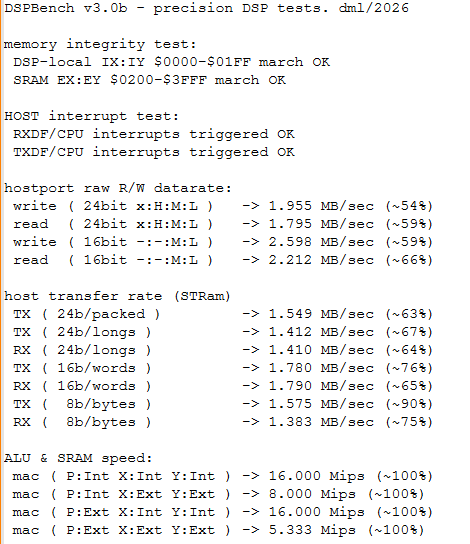
EXPERIMENTAL. Discussion, test results and feedback in the forum thread HERE. THE PROBLEMWhen the DFB1X (or the original DFB1) is enabled, data transfers between the CPU and the Falcon's DSP over the DSP "host port" run a lot slower than on a stock Falcon. DSPBENCH v3 shows the host port running at roughly half to two thirds of stock speed. It isn't just the DFB1X either, the CT60/CT63 show much the same figures. Most software doesn't care, but anything which pushes a lot of data through the DSP can suffer. Acetracker is the usual example, where it can give "CPU Overload" errors.
DSPBENCH v3.0b with the DFB1X enabled and the stock U68 GAL. Host port transfers are only around 54% to 76% of stock speed. So what causes it?The cause is inside the Falcon itself. When any accelerator takes over the bus, one of the Falcon's GAL chips (U68) adds an extra clock delay before it starts the DSP access. On top of that, Combel replies one cycle later in that mode. Every single host port transfer gets slowed down, and it adds up very quickly. This was tracked down by Badwolf and pakman back in late 2025. pakman produced the modified GAL, and Badwolf got the original DFB1 up to around 85% of stock speed with it and some firmware changes. The last 15% was a mystery which never got solved. EXPERIMENTAL SOLUTIONThe fix comes in two parts, and you need both of them:
WARNING: Do not run the 1.06 DSP firmware
with the stock Atari U68 GAL fitted. The firmware expects the new GAL
timing. If you want to go back to the original GAL, put the release
firmware back on the DFB1X as well.
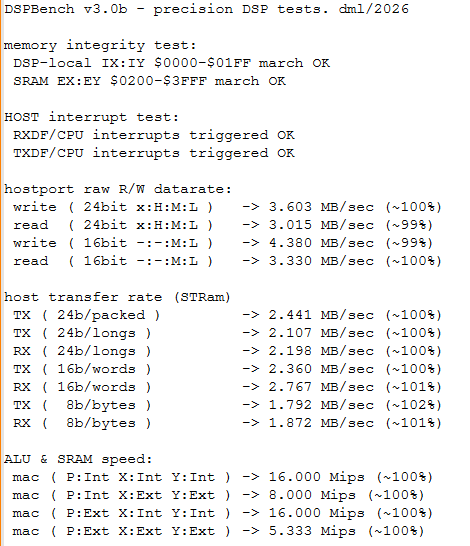
ResultsWith the 1.06 DSP firmware and the U68turbo GAL, DSPBENCH v3.0b reads 99% to 102% on every host port and ST-RAM transfer test. That is stock Falcon speed, with the DFB1X enabled. Acetracker also played without giving the "CPU Overload" error.
DSPBENCH v3.0b with the DFB1X enabled, 1.06 DSP firmware and the U68turbo GAL fitted. Keeping your Falcon originalThe only change to the Falcon is swapping one GAL chip. Nothing is cut or soldered on the motherboard. Keep the original Atari U68 somewhere safe, and if you ever want the machine back to stock, just put it back in (along with the release DFB1X firmware). Testing so farWith the DFB1X enabled, the following all work fine:
Acetracker was also checked with the DFB1X disabled and the new GAL fitted, and works fine. What still needs testingPlease report back in the forum thread if you try any of these:
DownloadsTest softwareBoth written by dml (Doug Little):
FAKE GAL CHIPSThe original U68 is a 12ns part (GAL16V8-12). The fix makes the DSP access go through two stages of logic inside the GAL, one after the other, so the speed of the chip matters a lot more than it did before. A slow chip effectively costs you double. The problem is that a lot of GALs sold online are fakes. Old slow chips get the markings sanded off and get relabelled as faster parts, and there is no way to tell just by looking at them. A fake might program and verify perfectly in your programmer, then cause random crashes in the Falcon. Only use a GAL16V8 which you know is genuine, and which
is at least as fast as the original 12ns part. Slower parts have not
been tested. Atmel ATF16V8 parts have not been tested either. Some versions
have a power-down feature which can use pin 4, and on U68 pin 4 is a
live signal.
Sadly there is no simple way to check the real speed of a GAL at home. The differences are only a nanosecond or two, which is far too small to measure reliably even with a decent scope. So buy from a source you trust, and if you get crashes or odd behaviour after fitting the new GAL, try a different chip from a different supplier before anything else. The GAL is guilty until proven innocent. CREDITS
|
||
|
|